

If an AI tool can change who sees a message, what they see, or whether they qualify for something, I treat it as a risk that needs rules. A one-time legal check is not enough. Models shift, data changes, and bad outputs can spread fast across ads, email, chat, and CRM workflows.
Here’s the short version of the article:
- I list every AI workflow in marketing, including built-in tool features
- I sort each one into low, medium, or high risk
- I assign one owner and a clear approval path
- I document data source, consent, retention, and access
- I require human review for sensitive claims and segmentation
- I keep logs, model records, and incident notes
- I check for bias, drift, complaints, and consent gaps
- I review systems on a fixed quarterly schedule
A simple checklist like this matters because AI errors do not stay small for long. In marketing, one bad prompt, one weak segment rule, or one vendor data term can affect thousands of people at once. That is why I focus on lifecycle control: map it, rate it, review it, log it, and check it again.
This article lays out that process in a way a small or midsize team can use right away.
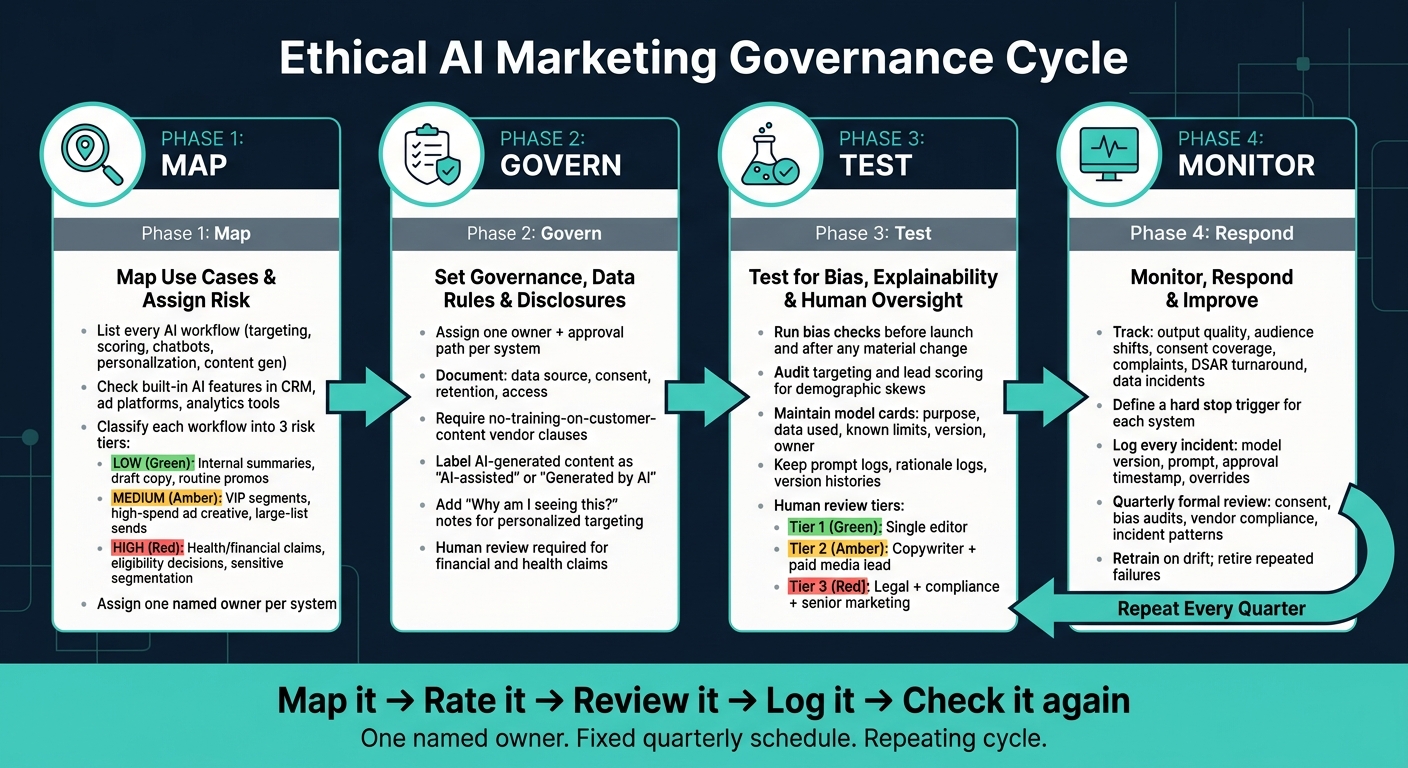
Ethical AI Marketing Checklist: 4-Step Governance Cycle
1. Map use cases and assign risk levels
List every AI workflow in your marketing stack
Start by listing every AI touchpoint in your marketing stack. That includes targeting, intent prediction, content generation, personalization, recommendations, chatbots, and predictive scoring.
Don’t stop at the obvious stuff. Hidden defaults inside tools you already use can be the bigger problem. Check the built-in AI features in your CRM, ad platforms, and analytics tools too.
For each system, document three things:
- Where the data comes from
- What output the system produces
- Whether a human reviews that output before a customer sees it
Also look closely at your vendor contracts. If a vendor uses your CRM uploads or prompts to train its global models, that counts as an automated touchpoint - and a compliance risk. Add no-training-on-customer-content terms to those contracts.
Once you finish the inventory, sort each workflow by impact and automation level.
Separate low-risk assistive uses from high-risk automated decisions
Rank each workflow based on customer impact, automation level, and brand risk. A simple three-tier model works well:
| Risk Level | Workflow Examples | Review Requirement |
|---|---|---|
| Low | Internal summaries, draft copy, routine promotions | Single-editor sign-off after automated checks |
| Medium | VIP segment personalization, high-spend ad creative, large-list sends | Two-person review (copywriter + performance lead) |
| High | Health claims, financial claims, eligibility decisions, sensitive segmentation | Full cross-functional sign-off: legal, compliance, and senior marketing |
Treat inferred sensitive data as high risk. AI systems can connect harmless-looking signals, like browsing behavior and ZIP codes, and infer sensitive traits such as health status or religion. Regulators treat those inferences the same way they treat directly disclosed sensitive data. So if a workflow infers sensitive traits, mark it as high risk.
Give each system a model owner. That person should handle monitoring and escalation.
After you set the risk level, define clear ownership and review rules for each tier.
sbb-itb-daf5303
Ethical AI and Responsible Marketing Practice
2. Set governance, data rules, and disclosure standards
Once risk levels are set, you need to lock down ownership, data rules, and disclosure requirements for each system.
Assign an owner and approval path for each system
Give each system one named owner. That person is on the hook for launches, model changes, overrides, and escalations.
It also helps to set up a small cross-functional review group with people from marketing, data, legal, and compliance. Write down who can decide what, how escalations work, and what the override or rollback path looks like. Every system needs an approval path before go-live. And if that system changes in production, it should go through that same path again.
Low-risk workflows can move through a lighter review. High-risk workflows need broader sign-off.
Document data sources, consent, retention, and access
Before any system goes live, document four things:
- where the data came from
- what customers agreed to
- how long the data is kept
- who can access it
Keep consent records separate for analytics, personalization, and advertising. That’s the safer default.
For retention, keep chat logs and inference logs for the shortest window you need. On the vendor side, get written confirmation that customer data is not used to train the vendor’s global models. Don’t deploy without that clause.
Document source, consent, retention, and access:
| Documentation Category | What to Record |
|---|---|
| Data Sources | Origin (zero-party, CRM, third-party), inferred attributes, PII classification |
| Consent | Purpose-specific records (ads vs. analytics), timestamp, disclosure version, revocation path |
| Retention | Log expiration windows, right-to-forget triggers, raw data deletion timelines |
| Third-Party | No-training clauses, subprocessor list, regional processing location, SOC 2 or ISO status |
Access should be limited to the people who need it. Spell out those permissions clearly, then review them any time team roles change.
Define when AI disclosure is required
Disclose AI use in customer-facing copy, chat, email personalization, and support flows. Use plain-language labels like "AI-assisted" or "Generated by AI" on AI-generated content and chatbots. For personalized targeting, add a short "why am I seeing this?" note.
If a message includes financial or health claims, require human review plus senior marketing or legal approval before it goes out.
After these rules are set, move on to testing for bias, explainability, and human oversight.
3. Test for bias, explainability, and human oversight
Once your governance and data rules are set, the next step is simple: make sure each system does what it’s supposed to do. The amount of testing should match the risk tier you already assigned, especially when using AI workflow tools for lead generation.
Run bias checks across relevant audience segments
Test each system before launch and again after any material change. That includes stress tests built to mimic unfair edge cases, not just normal campaign conditions.
For targeting and lead scoring, run regular algorithm audits so demographic skews don’t quietly grow over time.
| AI Workflow | Fairness Check |
|---|---|
| Targeting | Audit for underrepresented groups; check for disproportionate delivery to vulnerable segments. |
| Lead Scoring | Regular algorithm audits to identify uneven outcomes across demographics. |
| Personalization | Provide preference controls to manage settings; use explainability statements. |
| Content Generation | Human review for factual integrity; check for cultural appropriation and inclusive imagery. |
Use the same test set after retraining, audience shifts, or new campaign launches. That way, you’re comparing like for like instead of guessing whether the system changed.
Keep decision records that people can understand
Every AI system in your marketing stack should have a simple model card. It should spell out what the system does, what data it uses, its known limits, version history, and who owns it.
That’s only part of the paper trail. You should also keep prompt logs, rationale logs for AI-generated content, version histories, and explainability statements. If someone questions a campaign - inside the company or outside it - you need a clear record of what the system was told to do, what it produced, and how that output was reviewed.
Set human review rules for sensitive use cases
Not every output needs human review. Some do, no debate. Use the same risk tiers to decide how much approval is needed.
| Review Tier | Risk Level | Required Approvers |
|---|---|---|
| Tier 1 | Low (routine promos) | Single editor |
| Tier 2 | Medium (high-value/VIP segments) | Copywriter + paid media lead |
| Tier 3 | High (financial, health, legal) | Legal + compliance + senior marketing |
Tier 3 should cover health or financial claims, regulatory-sensitive or brand-sensitive communications, and any output with odd targeting patterns or language that could come across as manipulative or discriminatory.
If your team pushes a high volume of work, a 10-minute daily triage can help catch flagged outputs before launch. Log every override, flag, and sign-off in the same record.
4. Monitor, respond, and improve on a fixed schedule
Once a system goes live, testing only matters if monitoring keeps up. Models drift. Audiences change. Rules change too. That’s why it helps to use the same risk tiers to decide how often each system gets checked and when an issue needs to be escalated. The named owner should handle monitoring, documentation, and escalation.
Track drift, anomalies, complaints, and policy violations
The table below shows what to track and what each metric can reveal:
| Monitoring Metric | Issue Detected | Action Required |
|---|---|---|
| Output quality | Model drift | Retrain with fresh data |
| Audience shifts | Algorithmic bias | Audit dataset for underrepresentation |
| Consent coverage | Disclosure or compliance failure | Update disclosure and opt-in triggers |
| Complaints | Ethical or brand risk | Immediate review or pause |
| DSAR turnaround | Accountability failure | Review data access and deletion workflows |
| Data incidents | Policy violation | Audit API settings and vendor contracts |
Build escalation, rollback, and incident log processes
Every system needs a defined hard stop. In plain English, that means a specific action the brand will not take, no matter what the model produces. If that line gets crossed, the response should be automatic: pause the system, notify the model owner, and open an incident log before review.
That log should include the model version used, the exact prompt, the approval timestamp, any manual overrides, and incident notes if escalation occurred. Keep this in one centralized audit log that marketing, legal, and compliance can access.
Review quarterly, retrain when needed, and retire repeated failures
Run a formal review every quarter. Check consent coverage, bias audit results, vendor compliance, and patterns in the incident log. Update policies when regulations change. Retrain any system showing measurable drift or uneven demographic outcomes. If a system keeps failing transparency, accuracy, or accountability standards, retire it.
Conclusion: Treat the checklist as a standing operating standard
Ethical AI marketing isn’t a one-and-done signoff. It’s a repeatable cycle: map use cases, assign risk, set rules, test for bias, and monitor on a fixed schedule, with one named owner accountable at each stage.
That setup matters because ethical oversight needs to hold up after launch, not just before it. Monitoring helps protect trust and performance by catching drift before it spreads.
Models drift. Rules change. So the checklist needs to run on a fixed schedule.
Treat the checklist as a standing operating standard.
FAQs
How do I assign AI risk levels?
Group each AI marketing use case by how much harm it could cause to people’s rights, safety, or data privacy.
- Tier 1: Low risk. Use this for internal drafting or brainstorming based on public information. Oversight can stay light.
- Tier 2: Medium risk. Use this for internal strategy work or tasks involving pseudonymous data. Require logging and approved tools.
- Tier 3: High risk. Use this for work involving identifiable customer data, pricing decisions, or ROI projections. Require a formal privacy review and legal approval.
What counts as sensitive segmentation?
Sensitive segmentation happens when AI sorts or targets people based on sensitive personal attributes. That can include direct data, like health details, race, religion, exact location, financial status, or biometric markers.
It can also happen in a less obvious way. An AI system may look at neutral signals - like purchase history, browsing habits, or ZIP codes - and use them to infer protected traits, even when the user never clearly agreed to that use.
What should be in an AI incident log?
An effective AI incident log should include immutable records of system actions, and each record should have its own audit ID.
It should also track timestamps for:
- Consent decisions
- Preference updates
- Changes to compliance policies
- Changes to AI system configurations
Beyond that, log model inputs and outputs, access control changes, and data processing activities.
These records help teams review incidents inside the company, spot patterns that keep showing up, and show good-faith compliance during external inspections.
Related Blog Posts

