
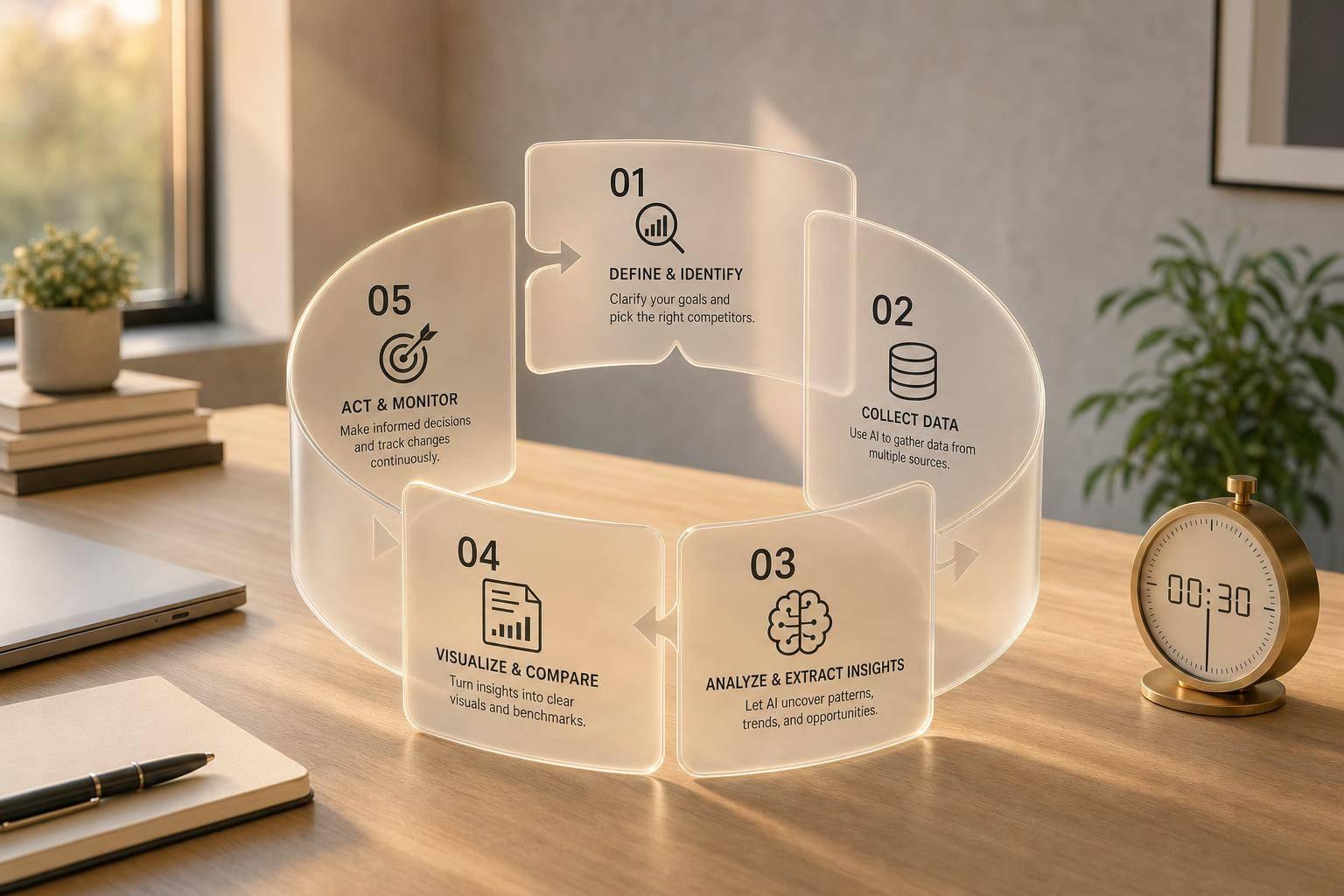
You can turn public competitor signals into action in under 30 minutes. In this guide, I focus on a simple 5-step process: pick the right competitors, use AI to sort the data, check search and sentiment signals, rank the next moves, and review the work on a set schedule.
Here’s the short version:
- I start with 5–10 competitors, based on audience overlap and search visibility.
- I pull only public data like pricing pages, ads, blog posts, social posts, and reviews.
- I use AI for SWOT, messaging checks, and gap analysis with clear prompts.
- I benchmark SEO, traffic, paid ads, and customer sentiment.
- I rank actions by impact, effort, and speed to impact.
- I review findings weekly, monthly, and quarterly so the process stays useful.
A few numbers stand out: AI-led monitoring can be 85% more accurate than manual review, and it may give teams a 15–30 day head start on competitor moves. That matters when ad costs are high and message shifts happen fast.
Quick Comparison
| Step | What I do | Main output |
|---|---|---|
| 1 | Pick priority competitors and sources | Focused watch list |
| 2 | Use AI prompts to sort raw data | SWOT, messaging, and gap notes |
| 3 | Check search, traffic, ads, and reviews | Benchmarks and sentiment summary |
| 4 | Rank the next moves | Action list with owners |
| 5 | Run it on a schedule | Repeatable review cycle |
If I want competitor research to lead to action, this is the process I’d use.
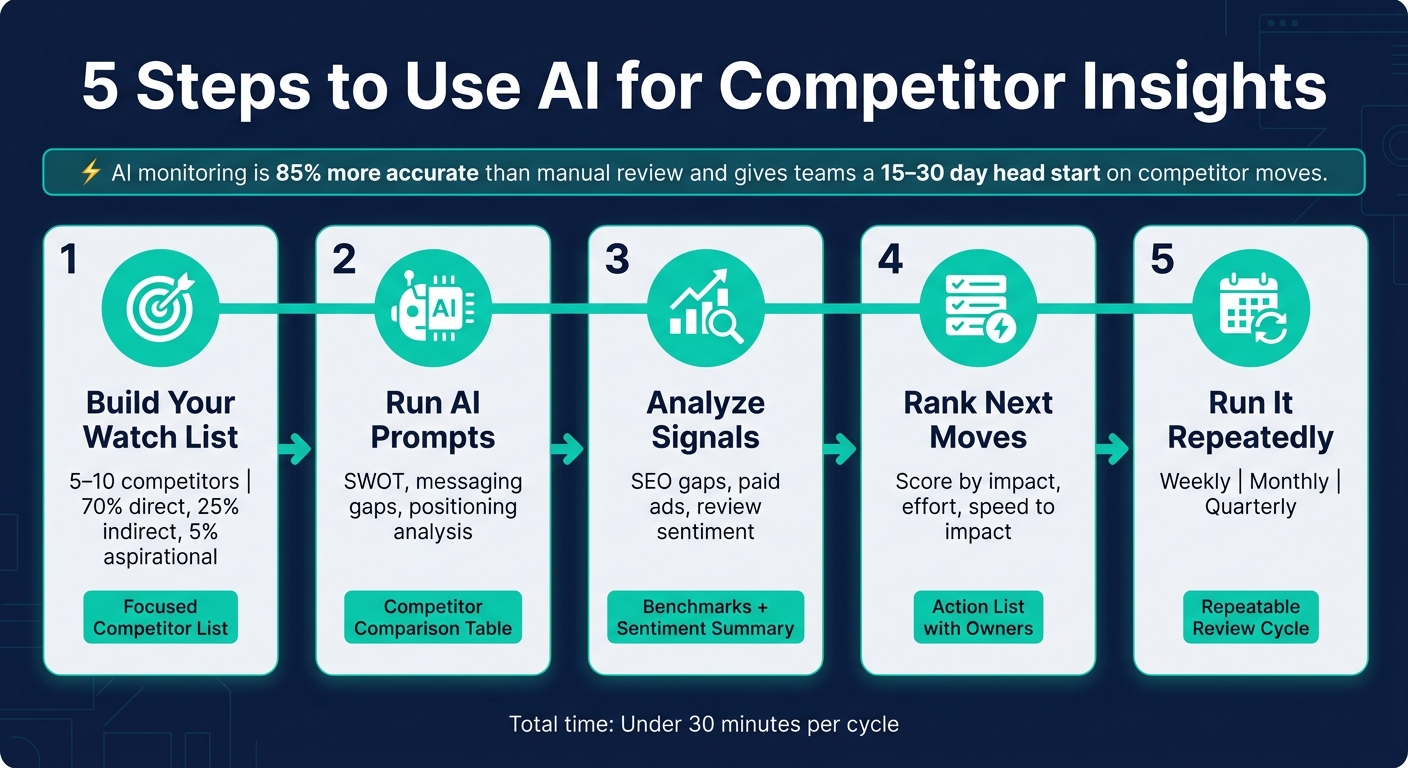
5-Step AI Competitor Intelligence Process (Under 30 Minutes)
How to use AI to do quick competitive analysis
Step 1: Choose Your Priority Competitors and Build a Data List
Start with a short list of competitors tied to revenue. If your list gets too broad, the output gets noisy and the next steps get fuzzy.
Shortlist Competitors by Audience Overlap and Search Visibility
Group competitors into three buckets: direct (same product, same audience), indirect (different product, overlapping audience), and aspirational (market leaders that show where the category is going).
A simple way to find them is to search terms like "best [category] software" and "alternatives to [brand]." The names that keep showing up in organic results and ads are already winning attention in search. That matters. If people keep seeing the same brands, those brands are part of the buying conversation.
Then add what your sales team is hearing. Ask reps which competitors come up most in deals. That feedback helps you avoid a list built only from search results.
Keep the list to 5–10 domains; adding more tends to weaken focus. A solid split looks like this:
- 70% of monitoring effort on direct competitors
- 25% on indirect competitors
- 5% on aspirational brands
Once you lock the list, AI can compare each competitor using the same set of inputs.
Match Each Competitor to the Right Public Data Sources
Each competitor type leaves clues in different places. The goal is to match each one to the sources most likely to show movement.
| Competitor Type | Primary Data Sources | Key Signal | Review Cadence |
|---|---|---|---|
| Direct | Website, Pricing Pages, G2/Capterra | Pricing shifts, feature gaps | Weekly |
| Indirect | Blog, Social Media, Ad Libraries | Messaging themes | Monthly |
| Aspirational | PR News, Job Boards, Annual Reports | Strategic pivots | Quarterly |
| SEO Rivals | Semrush, Ahrefs, Similarweb | Keyword overlap, share of voice | Biweekly |
These sources give AI a clean, repeatable input set for side-by-side comparison.
For bigger shifts, add hiring data to the same source list. If a competitor suddenly starts hiring engineers for a certain technology, that can hint at where its product is headed - often 15–30 days before any public announcement. Put that next to changes in website meta descriptions, and patterns start to show up before the market sees them.
Set up a simple spreadsheet for each competitor with:
- name
- tier (1, 2, or 3)
- website URL
- primary value proposition
- pricing model
- top keywords
- review cadence
This sheet becomes the input for Step 2.
Step 2: Use AI Chatbots to Structure Your Competitive Analysis
Once you have your Step 1 competitor list and source material, use an AI chatbot to turn that raw information into something you can actually work with.
Run SWOT, Messaging, and Gap Analysis with Clear Prompts
Bad prompts lead to bland answers. So instead of asking, "What are my competitors doing?" give the chatbot a job with a clear target.
For example:
- "Compare these two versions of a homepage and explain the strategic shift in their positioning."
- "Review these G2 review clusters and identify the top 3 complaints and the top 3 loved features."
The more specific your input is, the more useful the output tends to be.
A good first move is to assign the AI a role. Something like "Act as a senior marketing strategist specializing in competitor research" sets the tone and helps shape the level of detail. Then give it the material you pulled in Step 1, such as homepage copy, product pages, pricing page HTML, review clusters, recent blog titles, or ad screenshots.
| Material Type | Specific Inputs to Upload | Desired AI Output |
|---|---|---|
| Pricing | HTML or screenshots of pricing tiers | Tier renaming, dropped features, new bundles |
| Positioning | Homepage headlines, "About" pages | Vocabulary shifts, target segment changes |
| Sentiment | G2, Trustpilot, or Reddit review clusters | Unmet needs, recurring complaints |
| Content | Top 10 blog URLs, newsletter subject lines | Topic gaps, SEO authority themes |
You can also ask the AI to break down a competitor's offer into features, pricing, and claims, then rebuild a stronger version for your brand. For messaging gaps, feed it a competitor's recent blog titles and ask who the posts seem to be written for, plus which reader questions they touch on but don't answer well.
That method matters because, as Plexo Logic notes:
"The businesses getting real value from this are not asking vague questions... They are feeding it structured inputs, asking focused questions, and turning the answers into decisions." - Plexo Logic
Keep SWOT, messaging, and gap analysis in separate prompts so each response stays on track. Then use those outputs to make a side-by-side comparison table.
Build a Competitor Comparison Table from AI Outputs
After you have separate analyses for each competitor, ask the AI to pull them into one comparison view. A plain, direct prompt works well here: "Output the findings in a Markdown table with columns for Competitor, Positioning Theme, Strengths, Weaknesses, and Opportunity for Our Brand."
Here’s what that can look like:
| Competitor | Positioning Theme | Strengths | Weaknesses | Opportunity for Our Brand |
|---|---|---|---|---|
| Competitor A | Premium/Enterprise | High brand authority, deep feature set | Complex pricing, slow support | Simplify pricing for mid-market buyers |
| Competitor B | Low-cost/Agile | Fast implementation, transparent cost | Limited integrations, basic UI | Highlight a robust ecosystem |
| Competitor C | AI-First/Innovation | Cutting-edge tech, frequent updates | High learning curve, unproven ROI | Lead with human-led reliability |
Before you share the table, check the key claims against the source material. AI can organize a mess fast, but it can also smooth over details that matter. That table becomes your working draft for Step 3, where you layer in search, traffic, and sentiment signals.
sbb-itb-daf5303
Step 3: Analyze Search, Traffic, Messaging, and Sentiment with AI
Step 2 showed what competitors say. Step 3 shows where they get seen, which topics bring in traffic, and how customers react.
Benchmark Search and Traffic Signals
SEO tools can sum up organic traffic, top pages, and keyword gaps - meaning high-value, low-difficulty terms they rank for and you don’t. Then group those keywords into themes. That makes it much easier to spot whether a competitor is putting effort into educational content, comparison pages, or bottom-of-funnel pages built to convert.
Paid search matters too. Use the Meta Ad Library and Google Ads Transparency Center with AI to spot the main offer, message angle, and audience a competitor is leaning into. That gives you a clearer read on what they want buyers to notice first.
Use the table below to turn those signals into a clean benchmark.
| Benchmarking Signal | What AI Does | Tools to Use |
|---|---|---|
| Organic Traffic | Summarizes domain patterns and traffic trends | SEMrush, Similarweb |
| Keyword Gaps | Flags high-value terms you're missing | Ahrefs, Moz, SEMrush |
| Paid Search | Identifies top ad themes and landing page focus | Meta Ad Library, Google Ads Transparency Center |
| Share of Voice | Tracks brand mentions across news, blogs, social media, and search results | Mentionlytics, Sprout Social |
| Backlink Trends | Spots backlink patterns and link opportunities | Ahrefs, Moz |
Track Messaging Themes and Customer Sentiment
Traffic tells you what ranks. Sentiment tells you why people care.
Use AI to group content themes and sort review sentiment. For example, feed an AI assistant the last 20 blog post titles from a competitor and ask it to label them by theme - pricing, product updates, customer success, thought leadership - and estimate the reader each post seems built for. You’ll spot pretty fast where that company is putting its content budget and attention.
For sentiment, pull review clusters from G2, Trustpilot, or Reddit and ask AI to sort them by topic and emotion. The most useful output is often the repeat 1-star complaint. If customers keep calling out "slow support response times" or "hidden fees", that’s not just noise. It’s a plain-English opening for your own positioning.
Buyer sentiment shifts faster than quarterly reports.
Sales call transcripts help here too. AI can scan a batch of calls and surface how often a competitor comes up, the setting in which prospects mention them, and the objections tied to those mentions. That gives you direct input for message gaps you can use in pages, ads, and sales enablement.
| Messaging Theme | Sentiment Signal to Watch | AI Output |
|---|---|---|
| Pricing | "Hidden fees", "too expensive for small teams" | Counter-position with transparent, startup-friendly pricing |
| Product Features | "Too complex", "steep learning curve" | Emphasize ease of use in landing page copy |
| Customer Support | "Slow response", "automated loops" | Highlight human support in sales battlecards |
| Innovation | "Repackaged old features" | Detect roadmap signals from job ads and patent filings |
Where Hello Operator Fits for Custom Monitoring Workflows
This work gets more useful month after month. Hello Operator can build custom AI agents that automate repeat competitor monitoring and send findings into Slack or your CRM, with human review before anything moves forward. That human-in-the-loop setup gives teams a check point before AI output turns into a marketing call. For U.S. teams that need repeatable competitor reporting, that layer is worth putting in place early.
Use those repeat outputs to rank actions in Step 4.
Step 4: Turn AI Findings Into Prioritized Marketing Actions
Focus on the small set of moves most likely to affect revenue. If you don't, those insights just sit in a shared doc and go nowhere. Use the signals from Step 3 to rank each opportunity before you hand it off to the team.
Rank Actions by Impact, Effort, and Revenue Relevance
Score each opportunity across three factors: likely revenue impact, implementation effort, and speed to impact.
A quick win, like a low-difficulty keyword gap where a competitor ranks for a term you don't, will usually score well on all three. A homepage messaging overhaul is different. It may have a big upside, but it often takes more time, which makes it harder to put first.
Another strong move AI can flag is a channel budget shift. Say a competitor is pouring money into Google Ads while easing off another channel. That may point to an opening: shift budget toward the neglected platform and reach those audience segments at a lower cost. If you want to make that move part of your routine, build playbooks for common scenarios so your team can go from insight to action within 48 hours.
Add Human Review, Governance, and Ownership
AI output should kick off the process, not end it. These tools can carry a 20–50% margin of error in spend estimation, so no major budget move should happen without a manual check.
A simple governance setup works on two rhythms:
- A weekly 45–60 minute review for alerts, budget signals, and anything that needs a fast response
- A monthly session for battlecard updates and prompt library updates
Write down the prompt and the logic behind it so the analysis can be repeated the same way next time. And assign a named owner to each action, not just a department.
Once an item is approved, the owner and review cadence should push it straight into execution.
Build a Simple Action Plan Table
Use this table to turn Step 3 signals into ranked actions. The AI insight trigger acts as the evidence behind each move.
| Action Category | AI Insight Trigger | Recommended Marketing Action | Priority Level |
|---|---|---|---|
| Search/PPC | Competitor increases bids on high-value keywords | Surgical budget response or shift to low-difficulty keyword gaps | High |
| Content | Competitor content gaining traction in a specific niche | Launch a gap-filling content cluster to address unexploited topics | Medium |
| Messaging | Negative sentiment detected in competitor reviews | Update homepage/ad copy to highlight your solution to those pain points | High |
| Creative | Competitor creative refresh frequency increases | Audit your creative for fatigue and launch new iterations to maintain SOV | Medium |
| Budget | Competitor abandons a specific social platform | Execute a channel spend shift to capture the abandoned audience at lower CPMs | High |
If your team needs help turning this table into live campaigns, Hello Operator offers on-demand AI marketing specialists who can turn ranked actions into workflows, briefs, and automations.
Conclusion: Run This 5-Step Process on a Set Schedule
These five steps work best as a loop. First, trim your competitor list. Then set up the analysis, benchmark the signals, and turn what you find into actions your team owns, with clear deadlines.
This should be a recurring process, not a one-off audit. AI-assisted monitoring gives you a lead-time edge only if you run it on a set schedule. One pass gives you a snapshot. Repeated runs show patterns.
Use that repeatable workflow to set your review cadence.
| Cadence | Focus | Signals |
|---|---|---|
| Weekly | Tactical alerts | Pricing updates, launches, landing-page changes |
| Monthly | Performance trends | Ad spend, SEO, engagement trends |
| Quarterly | Strategic review | Roadmap, funding, financial signals |
At the end of each cycle, refresh priorities, owners, and deadlines before the next review starts.
Keep the list tight. Give every action from each review cycle a named owner. That also means updating the ranked action table from Step 4 every time, so the end of one cycle becomes the starting point for the next.
FAQs
What AI tools work best for this process?
The best AI tools for competitor insights depend on what you need to learn. If your focus is SEO, social monitoring, or market analysis, the right pick will look different.
Ahrefs and Semrush are strong choices for competitor keywords, backlinks, and content performance. They help you see which terms competitors rank for, where their links come from, and which pages pull in traffic.
Brandwatch is useful for sentiment tracking and brand mentions. If you want to know how people talk about a company across social channels and the web, this is where it shines.
For deeper analysis, Claude can work through unstructured data like reviews, blog posts, and pricing pages. That makes it handy when you want to spot patterns in messy source material instead of just scanning dashboards.
Hello Operator takes a different route. It offers custom AI solutions that automate marketing tasks and plug into existing workflows, which can help teams move from insight to action without adding a pile of manual work.
How do I verify AI-generated competitor insights?
Cross-check AI-generated insights against actual market data before you act on them. Think of AI as a research analyst, not the final decision-maker. It can spot patterns fast, but those patterns still need a human review.
Reliability gets better when you pull from more than one source. Use a mix of primary observations and verified secondary reports, then compare what AI says against that input. Regular audits help too. They make it easier to catch gaps and confirm that AI summaries still line up with current market conditions.
How often should I update competitor research?
Move from static, manual updates to continuous, AI-driven monitoring. Instead of sticking to monthly or quarterly reviews, use AI to follow market shifts and competitor moves in real time.
For high-stakes areas like paid search or major product launches, check in daily or weekly so your team can react within hours, not weeks. Then update your full competitor list on a monthly or quarterly cadence.
Related Blog Posts

