
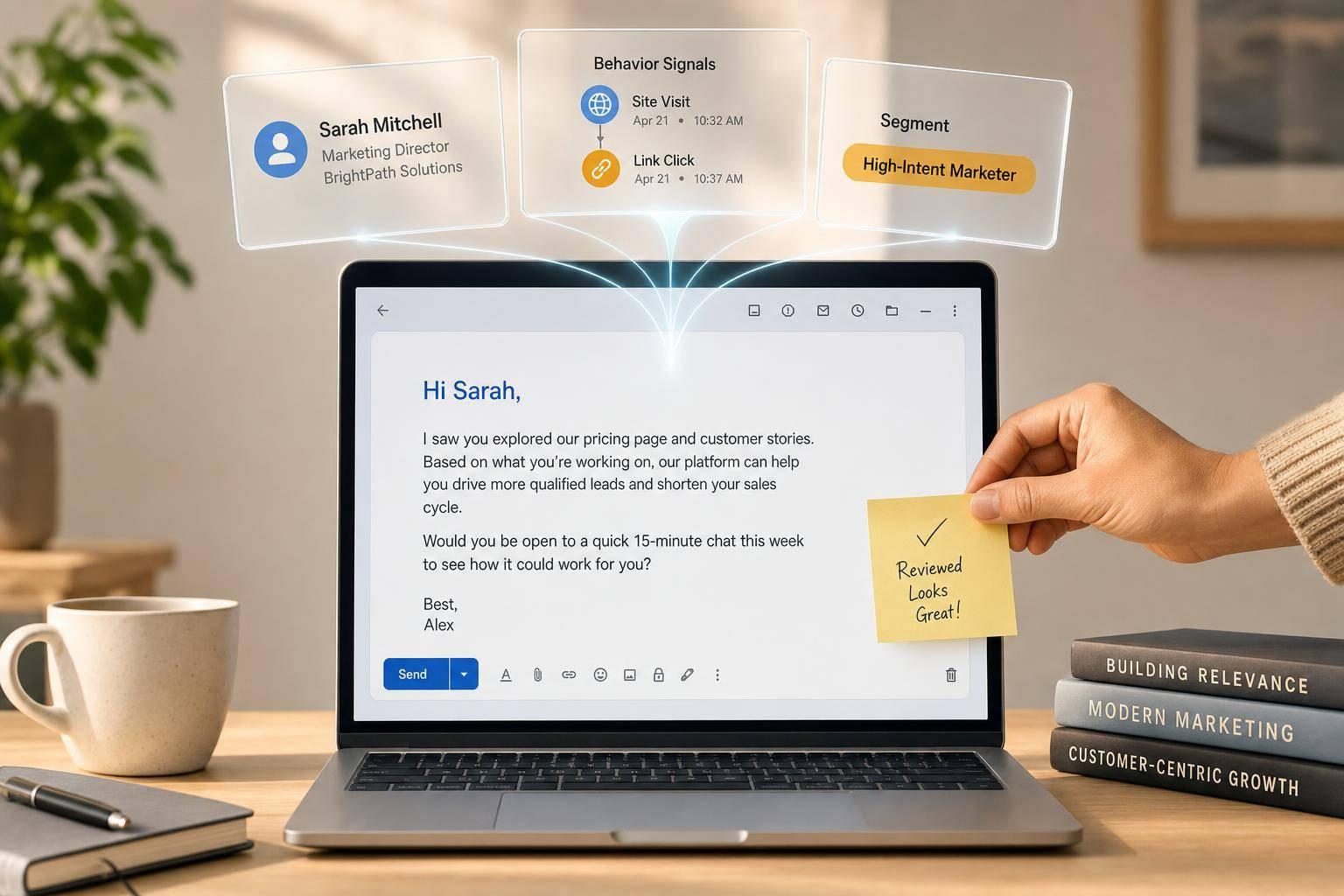
AI-personalized email can move more leads to meetings and pipeline - but only when the data is clean, the signals are real, and the messages are checked before send.
If I had to boil this article down to a few points, it would be these:
- Basic personalization is not enough. Adding a first name does far less than behavior-based email.
- Data comes first. AI needs CRM data, website activity, email history, consent status, and fallback fields.
- Segmentation drives results. Behavioral, stage-based, firmographic, and psychographic segments help match the message to the lead.
- Dynamic content works best when tied to proof. A pricing page visit, content download, or trial action is a better cue than a static field.
- Human review still matters. It helps catch tone issues, bad claims, and legal risk before launch.
- Measure business outcomes, not just opens. Focus on reply rate, meetings booked, pipeline, and revenue per recipient.
- Start small. Test one high-intent segment first, then compare against a 10% holdout group.
A few numbers stand out:
- Segmented campaigns can drive 30% more opens and 50% more clicks
- Personalization can lift revenue by 5% to 15%
- Send-time testing can improve opens by 15% to 25%
- Signal-based outreach can reach 18% reply rates vs. 3.4% for generic outreach
Here’s the simple takeaway: AI email personalization works best when I use clean data, clear buyer signals, tight segments, and human checks. If the signal is weak or the data is messy, the email should stay simple.
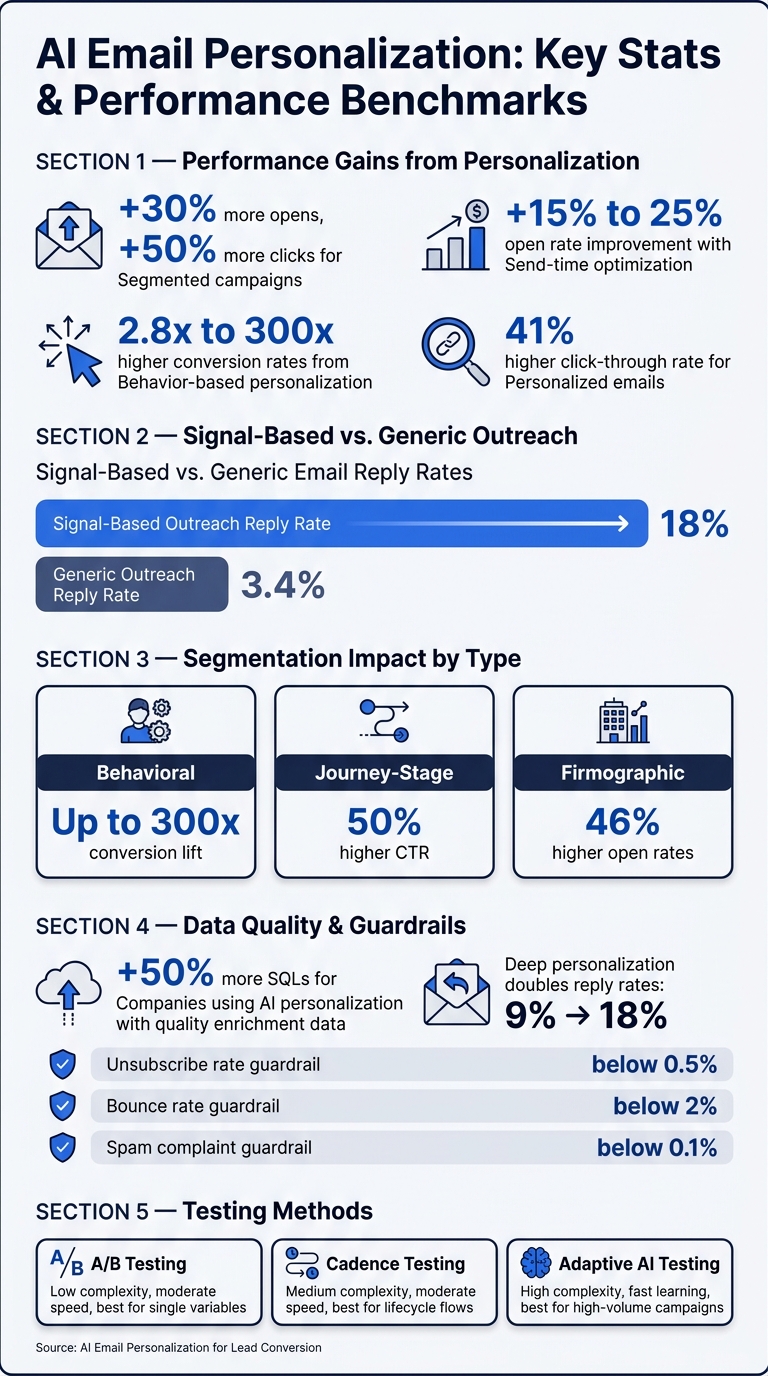
AI Email Personalization: Key Stats & Performance Benchmarks
How to Personalize Cold Email Outreach at Scale With AI to Get More Replies
sbb-itb-daf5303
Build the Data Foundation Before You Automate
AI personalization only works when your CRM, website, and email data are clean, connected, and based on consent. At scale, personalization depends on content, data, and delivery logic pulling from one source of truth. Start with the fields AI can rely on, then add behavioral signals on top.
What Data AI Needs to Personalize Emails Well
At a minimum, AI needs structured CRM data like lifecycle stage, firmographics such as industry and company size, website activity, email engagement history, and subscription status. From there, you can add intent signals like pricing page visits, content downloads, webinar attendance, enrichment data such as tech stack or hiring signals, and account triggers such as funding rounds.
That’s what separates personalization that feels useful from personalization that just drops in a first name and hopes for the best.
Data quality matters just as much as data volume. Clean up capitalization and formatting for names and company titles. Remove suffixes and titles from name fields. Standardize company names. Validate email addresses to keep bounce rates below 2%.
Each personalized field should also have a fallback value, such as {{firstName|there}}, so the email still sounds natural when a field is missing or out of date. Without fallbacks, you end up with broken greetings and awkward copy. Companies using AI personalization with quality enrichment data report 50% more Sales Qualified Leads (SQLs).
Once the data is clean, segment by intent, stage, and fit.
Segmentation Models That Improve Conversion
Once your data is in order, segmentation decides how well AI can match content to each lead. Three models tend to improve conversion again and again: behavioral, journey-stage, and firmographic segmentation.
| Segment Type | Data Needed | Best Use Case | Lead Conversion Impact |
|---|---|---|---|
| Behavioral | Website views, email clicks, content downloads | High-intent follow-ups, such as pricing page visitors | Very high - up to 300x conversion lift |
| Journey-Stage | Lifecycle stage, sales notes, deal value | Nurturing leads through the funnel with relevant CTAs | Moderate to high - 50% higher CTR |
| Firmographic | Company size, industry, tech stack | Initial outbound targeting and industry-specific proof points | Moderate - 46% higher open rates |
Behavioral segmentation often performs best because it goes after active intent. If someone visits your pricing page, clicks a product email, or downloads a buyer-focused asset, that’s a much stronger signal than a static profile field sitting in your CRM.
Where Hello Operator Can Help with Setup and Integration
Hello Operator can help connect CRM, website, and email data into one source of truth, with human review before personalization goes live. Once the data pipeline is connected, AI can personalize content and triggers without manual handoffs.
Use AI for Segmentation, Dynamic Content, and Triggered Emails
Once your data is clean and connected, AI can turn that information into three things that move conversions: who to focus on, what to say, and when to say it.
Predictive Segmentation and Lead Scoring
AI looks at behavior patterns like page visits, email clicks, content downloads, and trial activity. Then it groups leads based on what they’re most likely to do next. That gives your team a much better way to sort demand.
For example, a lead who visited the pricing page twice in seven days should not be treated the same as a cold contact who opened one email three weeks ago. AI helps make that distinction. It gives each lead a propensity score, so hot leads can go straight to sales follow-up while colder leads move into nurture.
The payoff is hard to ignore. Segmented campaigns produce 30% more opens and 50% more click-throughs than unsegmented sends.
The teams that do this well usually connect CRM, intent, and enrichment data to the AI layer. Just as important, they make sure every personalized claim links back to a signal they can verify.
Once AI can spot which leads matter most, it can shape the next message around that context.
Dynamic Content That Changes by Lead Behavior
AI can change the problem, proof point, and CTA for each lead. In plain English, it can swap the core message based on the recipient’s role and where they are in the buying process.
That means the same product can be framed in very different ways. A CFO-targeted email might focus on cost and risk. That same offer, sent to a VP of Marketing, might lean into pipeline and brand impact. Same product, different angle.
This kind of personalization can have a big effect. Brands using behavior-based email personalization see conversion rates between 2.8x and 300.7x higher than non-personalized emails, and personalized emails produce a 41% higher click-through rate on average.
There’s a catch, though. If a personalized claim can’t be traced back to a real signal, it’s better to use generic copy than make a shaky leap.
High-value or regulated sends should also go through human review before launch.
Human-in-the-Loop Review for Brand, Compliance, and Quality
AI can handle drafting and assembly. Humans should handle the judgment calls.
For high-value accounts, high-stakes sends, or any message that makes specific claims about a lead’s company, a human review step helps catch problems before they go live. That review makes sure the AI used a real signal, matched the right tone, and didn’t introduce compliance or brand risk.
Hello Operator can help implement review workflows, automated reporting, and team training.
Optimize Performance with Testing and Measurement
After launch, test which signals, offers, and timing choices actually convert. Review helps protect brand and compliance. Measurement tells you whether personalization is doing anything for lead conversion.
What to Test in AI-Personalized Emails
Start with subject lines and CTAs. Then move into dynamic content blocks, offers, and send timing.
Send-time optimization is worth testing once a contact has at least 3 to 5 prior interactions with your emails. At that point, the model has enough behavior data to make more reliable predictions. When STO is used the right way, it can improve open rates by 15% to 25%.
Personalization depth is another variable teams often miss. Compare shallow personalization with behavioral personalization to see how much lift deeper signals produce. Deep personalization has been shown to double reply rates - from 9% to 18%.
How to Measure Lead Conversion, Pipeline, and Revenue Impact
Measure conversion, pipeline, and revenue - not open rates alone.
Open rates should sit in the background, not at center stage. Privacy features can inflate them, which makes them less useful on their own. Revenue per recipient (RPR), reply rate, and meeting booked rate are stronger signs of actual performance.
Track three tiers:
- Revenue metrics: revenue per email sent, conversion rate, pipeline created
- Engagement metrics: CTR, reply rate, positive reply rate, meeting booked rate
- Guardrails: unsubscribe rate below 0.5%, bounce rate below 2%, spam complaints below 0.1%
For B2B, connect email engagement to CRM opportunity stages. Then track stage movement and time to opportunity by segment. Report quarterly.
Testing Methods Compared by Speed and Complexity
Use the simplest method that fits your list size and data volume.
| Method | Learning Speed | Complexity | Best For | Limitation |
|---|---|---|---|---|
| A/B Testing | Moderate | Low | Single variables, like subject lines and CTAs | Can only test one change at a time |
| Cadence Testing | Moderate | Medium | Lifecycle flows and cadence adjustments | Can be slow to react to real-time behavioral shifts |
| Adaptive AI Testing | Fast | High | High-volume campaigns and dynamic content | Requires significant data volume and advanced tooling |
For most teams, A/B testing is the best place to start. It carries low risk, the results are easy to read, and you don't need heavy infrastructure to get going. Adaptive AI testing starts to make sense at scale - but only after you have a tested baseline in place.
Use incremental holdout testing too. Exclude 10% of the list from personalization and compare results. That gap shows the actual lift from AI, and it's one of the clearest ways to justify the spend.
Conclusion: Build Personalization That Converts Without Losing Trust
AI email personalization works when clean data, real behavior signals, and human review make each send feel like the right next step. And the gap can be big: signal-based emails average an 18% reply rate versus 3.4% for generic outreach.
But that gain fades fast when personalization gets sloppy. Trust is easy to lose. Use data that feels too invasive, send emails with broken personalization fields, or scale before your data layer is clean, and credibility can take a hit almost overnight. A good rule of thumb: if a variable can't be explained in one sentence, don't use it.
Trust also comes down to legal follow-through. CAN-SPAM requires accurate sender identity and a working unsubscribe link, and CCPA adds notice and opt-out requirements.
Key Takeaways for Marketing Teams and Business Owners
The safest path is simple: start small, verify every signal, and scale only what shows it can convert.
Audit CRM data first. Start with one high-intent segment. Keep human review in the workflow. Measure revenue per recipient, reply rate, and meetings booked.
FAQs
What data should I clean first?
Start with your core data and structured CRM records. Pull identity and lifecycle details, like email addresses, CRM IDs, and lead stages, into one canonical subscriber profile.
Then standardize property definitions. Clean up suppression lists and consent statuses too, so personalization stays consistent, compliant, and in line with what each user has asked for.
How do I know which buyer signals are strong enough?
Strong buyer signals point to two things at once: a problem exists and there’s pressure to act.
That’s why signals like leadership changes, hiring surges, earnings initiatives, or recent funding matter so much. They often show that a prospect is in the middle of fixing something or shifting direction. That’s a lot more useful than static firmographic data alone.
Focus on signals that line up with your closed deals and are still recent enough to mean something. For instance, a job change can open a 90-day window when new leaders are more likely to make high-impact decisions.
You can gauge signal strength by tracking reply rates and working the signal into messaging that feels timely and relevant.
When should a human review AI-personalized emails?
Human review matters if you want to protect brand trust, keep claims accurate, and make emails sound like they came from a person who understands the reader.
For higher-stakes emails, add a QA step before anything goes out. This is especially important for:
- named-account outreach
- first touches to decision-makers
- high-value segments
A common setup is simple. Teams review 100% of cold emails during the first month, then move to a 20% to 30% sample once the output becomes more consistent.
During review, look for a few common problems:
- hallucinated content
- off-brand tone or voice
- broken personalization tokens
- bias or cultural insensitivity
Related Blog Posts

