
Real-time data integration allows marketers to analyze and act on live campaign data, like clicks, conversions, and revenue, without delays. This approach eliminates siloed data, speeds up decision-making, and boosts campaign performance by enabling quick adjustments to budgets, audiences, and creatives. It also helps meet privacy regulations like CCPA by centralizing first-party data under governed pipelines.
Key Benefits:
- Faster decisions: Adjust bids, budgets, and creatives during campaigns.
- Higher ROI: Identify and fix underperforming ads quickly.
- Personalization: Tailor offers and messages based on live user behavior.
- Compliance: Simplify data governance and respect user privacy.
How It Works:
- Define goals and map data sources (e.g., CRM, ad platforms, analytics).
- Build real-time pipelines for live data collection and processing.
- Use dashboards for instant insights and automation for rule-based optimizations.
- Add AI tools for predictive budgeting, audience targeting, and campaign adjustments.
Real-time data integration transforms marketing by reducing wasted spend, improving targeting, and enabling smarter, faster decisions. Tools like Hello Operator can help teams implement these systems efficiently.
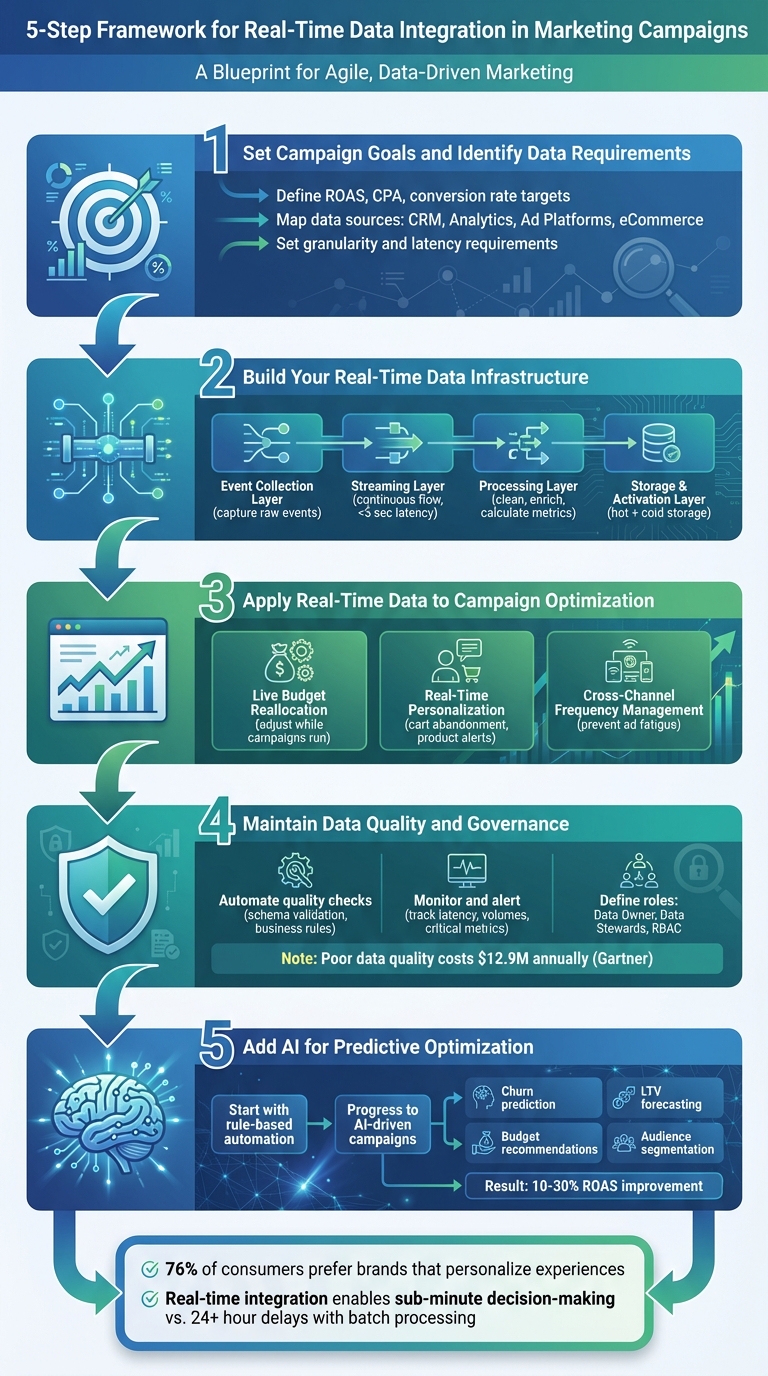
5-Step Real-Time Data Integration Framework for Marketing Campaigns
Dataflow for Real-time Marketing Intelligence
Step 1: Set Campaign Goals and Identify Data Requirements
The first step in creating a responsive, data-driven campaign is to establish clear, measurable goals. Before setting up a real-time data pipeline, define specific, numerical targets that align with your business objectives. Avoid vague goals - translate them into time-bound metrics linked to specific channels or audience segments. For instance, aim for something like: "Increase Facebook retargeting ROAS from 3.0 to 4.0 within 60 days" or "Reduce Google Search CPA for U.S.-based new customers from $45 to $35 by the end of the quarter". Goals should include key performance indicators (KPIs) such as ROAS, CPA, conversion rate, or revenue per session, along with target values in USD, defined timeframes (e.g., last 7 days, last 24 hours), and specific scopes (like channel, campaign, or audience). This clarity not only dictates the type of real-time data you’ll need but also determines how often updates should occur and how dashboards should aggregate the information.
Identify Key Data Sources
Once your goals are defined, the next step is to map each goal to its relevant data sources. Here’s a breakdown of essential data sources:
- CRM or customer data platforms (e.g., Salesforce, HubSpot, Klaviyo): These provide customer profiles, lifecycle stages, and lifetime value in USD, which are crucial for audience segmentation and value-based bidding.
- Web and app analytics (e.g., Google Analytics 4, Mixpanel): These platforms deliver behavioral data, such as sessions, events, and funnels, which can support intent-based triggers and personalization.
- Ad platforms (e.g., Google Ads, Meta Ads, TikTok Ads): These supply metrics like impressions, clicks, spend, and conversions for campaign-level insights and real-time budget optimization.
- eCommerce or point-of-sale systems (e.g., Shopify, BigCommerce): These sources provide data on orders, revenue, average order value, and refunds in USD, helping reconcile ad spend with actual sales.
- Email and SMS platforms: Metrics like sends, opens, clicks, and unsubscribes can inform adjustments to cadence and content.
- Customer support tools (e.g., Zendesk, Intercom): These can reveal ticket volumes and sentiment trends, which might trigger changes in campaign creatives or offers.
By prioritizing these sources, you get a comprehensive view of the customer journey - from media spend to revenue and overall experience. After identifying the sources, determine the level of detail and update frequency needed to inform decisions effectively.
Set Data Granularity and Latency Requirements
Granularity refers to the level of detail captured in your data. This should align with how decisions are made. For example:
- To improve ROAS, aggregate data at the ad set or campaign level per channel and per day or hour. This allows you to combine cost and revenue metrics for quick ad adjustments.
- To lower CPA, focus on per-click and per-conversion data at the keyword or audience level. This helps bidding algorithms or rules respond to underperforming segments.
- For retention and lifetime value strategies, use per-customer or per-order granularity. This includes data like customer ID, order value, product mix, and time since last purchase, enabling cohort analysis and personalized win-back campaigns.
- For personalization, per-session or per-event granularity is essential. This includes metrics like pages viewed, items added to cart, and scroll depth, which can drive real-time content or offer adjustments.
Latency - or how quickly data updates - should match the speed at which decisions need to be made:
- For on-site personalization and triggered messages (e.g., cart abandonment or product recommendations), aim for sub-minute or streaming latency so user events are processed within seconds.
- For live budget reallocation and bid adjustments, 5–15 minute latency is typically sufficient to address performance fluctuations.
- For executive reporting and daily pacing, such as monitoring spend versus daily budgets or ROAS by channel, a 15–60 minute latency strikes a balance between freshness and stability.
- For data quality checks and anomaly detection, near real-time updates (every 5–15 minutes) help catch issues like broken pixels, tracking outages, or sudden metric shifts before they impact an entire business day.
Create a Requirements Matrix
A requirements matrix serves as a bridge between your campaign goals and the technical specifications needed to achieve them. It outlines the data signals, sources, acceptable latencies, and team responsibilities for each goal. For example:
-
For "Raise Meta Ads ROAS", the matrix might specify:
- KPI: ROAS (Revenue ÷ Spend)
- Fields: campaign_id, adset_id, date, cost, clicks, conversions, conversion_value (USD)
- Sources: Meta Ads API + Shopify orders
- Granularity: Ad set, hourly
- Latency: ≤15 minutes
- Owner: Performance Marketing Lead.
-
For "Lower Google Search CPA", it might include:
- Fields: keyword, match type, device, conversions, and cost
- Granularity: Ad group or keyword level
- Latency: 5–10 minutes.
All values should be in U.S. dollars, and dates/times should align with local time zones (ET/PT) to ensure usability for U.S.-based teams. If your team lacks the expertise to create such detailed requirements, consider leveraging on-demand AI marketing specialists like Hello Operator to design the matrix and ensure your campaigns are backed by the right real-time data.
Step 2: Build Your Real-Time Data Infrastructure
After identifying your goals and data needs, the next move is setting up a system to collect and use data in real time. A solid real-time data infrastructure for marketing has four key layers that work together to transform raw information into actionable insights, often in just seconds or minutes. Each layer has a specific role, helping you make quick campaign decisions without unnecessary complexity or expense.
Core Layers of Real-Time Integration
The event collection layer is where it all begins. This layer captures raw events like ad impressions, clicks, page views, cart additions, form submissions, and purchases from every point in your marketing ecosystem. To ensure high-quality data, standardize how you gather information - use consistent user identifiers like hashed emails or device IDs and include consent flags to comply with privacy laws such as the California Consumer Privacy Act (CCPA).
Next, the streaming layer ensures these events flow continuously from their sources to downstream systems with minimal delay. Unlike traditional batch processing, this layer uses continuous message queues to keep everything moving in real time. This is especially critical during high-traffic periods like Black Friday, where the system might need to handle 10–20 times its usual load without missing key data. For different use cases, set specific latency goals: on-site personalization or triggered emails should aim for under five seconds, while bid or budget adjustments might need a window of 1–5 minutes to respond to sudden changes during a flash sale or product launch. Configuring this layer with at-least-once delivery and idempotent processing ensures critical events are captured reliably, even if occasional duplicates need to be resolved later.
The processing layer is where raw data becomes useful. Here, data is cleaned, enriched, and aggregated to create actionable metrics. This is where business logic comes into play - like mapping ad platform IDs to internal campaign names, adding regional details to ZIP codes for targeted optimizations, or linking web behavior with CRM data to tag events with lifecycle stages. You can also calculate real-time metrics such as cost-per-click (CPC), cost-per-acquisition (CPA), or return on ad spend (ROAS) by campaign, channel, and audience. This layer can even apply attribution rules, like a last-click model, to estimate revenue in real time, or flag behaviors like "high-intent" (e.g., visiting a pricing page multiple times in 24 hours) to trigger immediate automations.
Finally, the storage and activation layer serves as both a long-term data repository and an operational hub. This layer typically splits into hot storage for immediate campaign needs - like storing user profiles and recent events - and cold storage for historical analysis, modeling, and compliance reporting. Cleaned events are centralized in a scalable cloud repository, organized by key dimensions like channel or campaign. To avoid confusion, create standard tables or views for core entities (e.g., customer, session, campaign) with clear metric definitions. The activation side uses tools like reverse ETL or native connectors to push real-time segments and performance indicators into platforms like ad tools, email systems, and personalization engines. For example, you could sync a "high-value cart abandoner" audience (e.g., cart value over $200) to Facebook Ads or email platforms for recovery campaigns, while CMOs benefit from live dashboards and data scientists use the unified data source for modeling.
For companies in the U.S., data residency and privacy are critical considerations. Many businesses prefer U.S.-hosted cloud regions to meet contractual and industry-specific requirements, especially in sectors like finance or healthcare. Real-time pipelines should ensure primary storage and backups remain in chosen U.S. regions, while event schemas should include consent statuses to respect "do not sell/share" preferences under CCPA. Using hashed identifiers and minimizing personally identifiable information (PII) in event streams can further reduce risk while maintaining effective cross-channel measurement.
This infrastructure allows marketers to make immediate campaign adjustments, maximizing return on ad spend (ROAS) and minimizing wasted budgets. With these layers in place, it’s important to compare real-time processing to traditional batch methods.
Batch vs. Real-Time Integration
Breaking down these layers highlights why real-time integration often outperforms batch processing for immediate campaign actions. Batch processing - using nightly ETL jobs or hourly syncs - comes with lower costs and simpler pipelines but delivers data with delays of hours or even a full day. While suitable for tasks like monthly reporting or long-term analysis, it limits your ability to respond quickly to performance changes.
Real-time integration, on the other hand, keeps data fresh within seconds or minutes, enabling instant actions like budget reallocations, creative updates, and audience adjustments. Though it requires more investment in infrastructure and advanced stream processing, the benefits are clear. Real-time data supports triggered campaigns, dynamic content, live dashboards, pacing adjustments, fraud detection, and other safeguards to prevent wasted spend during critical periods. Research shows that 76% of consumers are more likely to purchase from brands that personalize their experiences.
| Dimension | Batch Integration | Real-Time Integration |
|---|---|---|
| Latency | Hours to 24+ hours | Seconds to a few minutes |
| Data Freshness | Reflects previous-day data | Up-to-the-minute or real time |
| Cost | Lower infrastructure expenses | Higher due to always-on services |
| Complexity | Simpler pipelines | More complex; requires monitoring |
| Campaign Impact | Best for reporting and strategy | Enables live adjustments |
| Use Cases | Reporting, cohort analysis | Triggers, dynamic content, dashboards |
Many organizations take a hybrid approach - using real-time data for operational needs like triggers and personalization, while relying on batch processing for analytics, historical reporting, or machine learning. This strategy balances the ability to act quickly with cost management for less time-sensitive tasks.
Step 3: Apply Real-Time Data to Campaign Optimization
Real-time data can help you cut down on wasted ad spend, recover missed conversions, and avoid overwhelming your audience with too many messages.
Live Budget Reallocation
By analyzing real-time performance data, you can adjust your ad budgets while campaigns are still running, rather than waiting for end-of-day reports. Start by streaming essential metrics - like spend, impressions, clicks, conversions, and revenue - into a centralized dashboard. Then, set clear rules for when to adjust budgets. For example, if a campaign’s ROAS (Return on Ad Spend) stays at or above 3.0 for 60 minutes and is using less than 80% of its daily budget, increase its funding by 15%. On the other hand, if the ROAS drops to 1.5 or lower for two hours and over 30% of the daily budget has been spent, consider reducing the budget by 25% or pausing the campaign entirely.
Another strategy is reallocating funds within the same platform. For instance, if a non-brand search campaign’s CPA (Cost Per Acquisition) exceeds your target by 150%, shift 10–20% of its budget to a branded search campaign instead. These kinds of rules ensure you’re not wasting money on underperforming campaigns and that high-performing ones get the resources they need.
Real-time data also plays a key role in delivering personalized, behavior-driven messaging.
Real-Time Personalization
Stream user activity - like product views, cart additions, checkout starts, and purchases - into your customer data platform or marketing automation tools. This allows you to set up automated workflows that respond to user behavior. For example, if a customer abandons their cart, you can send them a reminder within 30–60 minutes. If they still haven’t returned, follow up with an offer, such as a discount or free shipping. Similarly, you can notify users immediately when a product they’ve viewed goes on sale or is back in stock.
You can also increase engagement by sending emails with dynamic product recommendations tailored to their recent activity. Just make sure to comply with privacy laws like CCPA/CPRA, CAN-SPAM, and TCPA by using consent flags and suppression lists.
But real-time data isn’t just about budgets and messaging - it also improves how you manage audience engagement across multiple channels.
Cross-Channel Frequency Management
Even the best ads lose their effectiveness if they’re shown too often. Real-time data integration helps you track every interaction - whether it’s a paid impression, email, SMS, or push notification - so you can manage how often each user sees your messages. Start by assigning each user a durable identifier, like a hashed email or customer ID, and link it to platform-specific IDs (cookies, mobile ad IDs). Then, stream engagement data from ad platforms, email tools, and website analytics into a central system.
With this setup, you can create cross-channel rules to avoid overexposure. For example, if a user sees more than 20 paid ads in seven days without visiting your site, exclude them from prospecting campaigns. Or, after a purchase, pause acquisition-focused ads and limit remarketing to 1–2 impressions per day for a week. This kind of coordination not only saves money by reducing ad fatigue but also improves the customer experience by keeping your messaging relevant and timely.
sbb-itb-daf5303
Step 4: Maintain Data Quality and Governance
When dealing with real-time data, errors can snowball quickly, causing significant problems. According to Gartner, poor data quality costs organizations an average of $12.9 million annually due to lost revenue, inefficiencies, and compliance issues. Whether you're making budgeting decisions or personalizing marketing messages, you can't afford to catch issues - like broken tracking or incorrect ad spend figures - after the damage is done. Automating quality checks is key to ensuring your data remains reliable.
Automate Data Quality Checks
Automating error detection helps prevent data issues from derailing your campaigns. Start by implementing schema validation at every data ingestion point. For example, if an ad platform changes its data schema, your system should immediately flag the issue instead of allowing corrupted data to flow downstream. Create business rules specific to your marketing metrics - such as ensuring cost-per-click is above zero, impressions never fall below clicks, and return on ad spend (ROAS) stays within a realistic range. These checks should run continuously on your streaming data.
Another essential step is to run distribution checks that compare current performance to historical trends. For instance, if your click-through rate drops by 80% in just 10 minutes or your cost-per-acquisition doubles without any changes to bidding, it's a clear sign of a potential tracking or campaign setup issue. For U.S.-based teams, ensure monetary values are formatted in USD with two decimal places (e.g., $125,000.50), and use appropriate local time zones for spotting intra-day anomalies. Once these checks are automated, monitor them regularly to catch and address issues early.
Monitor and Alert for Issues
Dashboards are essential for keeping tabs on both the technical health of your data pipelines and your key business metrics. Track elements such as connector status (e.g., the last successful pull from each data source), data latency (how far behind real time your warehouse is), and record volumes compared to historical patterns. Monitor critical metrics like impressions, clicks, conversions, cost-per-acquisition, ROAS, and daily spend by channel and campaign.
Set up alerts based on severity levels. High-priority alerts - such as a major ad platform outage lasting more than 15 minutes or a blended ROAS dropping below 1.0 for 30 minutes while spending over $1,000 per hour - should immediately notify the on-call engineer and marketing lead. Medium-priority alerts might include data delays of more than 20 minutes or a non-critical channel going offline. Low-priority alerts can summarize daily trends, like spend deviating from the plan by more than 10%, and be sent as a digest for marketing managers.
Define Roles and Responsibilities
Clear ownership and accountability are vital for maintaining data quality. Assign a Data Owner for each critical domain - such as paid media or CRM - who will approve schema changes and set retention policies. Designate Data Stewards to enforce naming conventions, maintain taxonomies, and update documentation as needed.
Use role-based access control to manage permissions effectively. Analysts might have read-only access to detailed performance data, marketers could access campaign-level data and activation tools, and only a small group of administrators should handle integrations and API keys. For every new real-time data feed, follow a governance checklist: document the purpose of the feed, standardize all fields (including names, units, currencies, and date/time formats), implement quality rules, assess privacy considerations, assign owners, and define monitoring thresholds. This structured approach ensures your data infrastructure scales without letting critical details slip through the cracks.
Step 5: Add AI for Predictive Optimization
Once you’ve built a reliable, real-time data infrastructure, the next step is to integrate AI for predictive, automated optimization. This is where your system starts to shine, using the power of AI to make smarter, faster decisions. The key is to start with simple automation and gradually scale up to more advanced machine learning models. Begin with rule-based automation to react to live performance signals, then transition to AI-driven systems that predict future outcomes and fine-tune campaigns automatically.
Start with Rule-Based Automation
Rule-based automation is a straightforward way to use real-time data for immediate actions, without diving into complex AI just yet. For example, you might set rules like: “If CPA exceeds $50 for 30 minutes, reduce bids by 15% for that campaign.” Or, for budget adjustments: “If a campaign’s cost per purchase is 20% below target and has spent over $200 today, increase the daily budget by 25%, capped at $1,500. If it’s 20% above target, decrease the budget by 20%.”
These rules can be implemented directly within ad platforms or marketing tools, allowing you to test their effectiveness quickly. To ensure accuracy, establish minimum thresholds - such as requiring 50–100 clicks or $100–$200 in spend - before triggering any actions. Regularly review these thresholds, refine them weekly, and log every change to track performance. Once you’ve confirmed the value of these rules, you’ll be ready to move on to more advanced AI-driven solutions.
Progress to AI-Driven Campaigns
After stabilizing your rule-based systems for three to six months, it’s time to introduce AI-driven models. These models can predict customer behavior and campaign outcomes, enabling you to optimize automatically. For U.S. marketers, some of the most valuable applications include:
- Churn prediction: Estimating the likelihood that a customer will cancel a subscription within 30 or 90 days, based on their transaction history and engagement patterns.
- Customer lifetime value (LTV) prediction: Forecasting the long-term revenue a customer will generate, helping justify higher acquisition costs for high-value segments.
- Budget recommendation models: Algorithms that reallocate daily budgets across channels to maximize return on ad spend (ROAS) or minimize cost per acquisition (CPA).
- AI-powered audience segmentation: Grouping users by behavior and value to deliver personalized experiences at scale.
When combined with real-time data, AI can dramatically improve campaign performance. For instance, marketers often see ROAS improve by 10–30% by cutting waste on underperforming placements and reinvesting in top-performing ones. To measure the impact of AI, track metrics like ROAS, CPA, conversion rates, revenue per session, churn rates, and LTV/CAC ratios using real-time dashboards.
As AI takes on more control - adjusting bids, budgets, and even creative elements - it’s important to set clear boundaries. Define what AI can manage (e.g., bid adjustments within ±30% or budget shifts within specific limits) and what requires human oversight, such as final creative approvals in regulated industries. Starting with an “AI as co-pilot” approach lets you test AI recommendations on a small scale, using structured A/B tests to compare AI-driven decisions against rule-based or manual approaches.
How Hello Operator Can Help
Hello Operator can guide you through this transition to AI-powered optimization. Building on earlier stages of real-time data management, they offer tailored AI solutions to fit your business needs. Their services include developing custom AI applications that integrate seamlessly with your existing tech stack, automating tasks like lead scoring, personalized outreach, and competitor monitoring.
With monthly plans starting at $3,750 (or $5,950 for project-based solutions), Hello Operator provides hands-on support to help you implement predictive optimization without adding more full-time staff. Plus, they ensure your data privacy and give you full ownership of the AI tools they create for your organization. Whether you’re looking to automate daily workflows or unlock the potential of predictive analytics, Hello Operator has the expertise to make it happen.
Conclusion
Real-time data integration opens the door to faster decision-making, smarter budget allocation, and more precise customer targeting. With real-time insights into which channels and audiences drive the best results, marketers can quickly pivot, reallocating budgets from low-performing areas to strategies that deliver stronger outcomes.
This capability also enables large-scale personalization. By analyzing live behavioral signals - like page views or cart activity - marketers can trigger tailored messages and content within moments. When offers are timed to match a customer’s immediate intent, engagement and conversion rates naturally see a boost.
To keep these benefits intact, it’s essential to maintain robust data governance practices. Automated quality checks, standardized metrics, and regular audits of data pipelines ensure the insights remain accurate and actionable. As your real-time systems grow more advanced, integrating AI-driven predictive models can take your strategy even further - shifting from reactive adjustments to proactive campaign optimization that anticipates trends and prevents performance drops before they happen.
Think of real-time integration and AI as evolving tools. By consistently refining your models, expanding your data sources, and equipping your team with the right skills, you’ll stay ahead of changing customer behaviors. For expert support, Hello Operator offers on-demand AI marketing specialists who can create custom pipelines, develop tailored AI solutions, and train your U.S.-based teams. Together, these efforts lay the foundation for a marketing strategy that adapts and thrives alongside your business.
FAQs
How does integrating real-time data improve marketing campaigns?
Integrating real-time data into your marketing efforts lets you make quick, informed decisions. This capability enables you to adjust strategies on the fly, fine-tune your targeting, and deliver content that's tailored specifically to your audience's needs and preferences.
With live insights at your fingertips, you can increase engagement, drive better conversion rates, and get the most out of your investment. Plus, by spotting trends and opportunities as they emerge, your campaigns can remain timely and impactful.
What are the essential components of a real-time data system for marketing?
A real-time data system for marketing hinges on a few key elements that work together to provide timely insights marketers can act on. These include:
- Data collection from diverse sources like websites, social media platforms, and CRM systems.
- Integration and processing tools to combine and clean the data, ensuring it's ready for analysis.
- Real-time analytics and dashboards that allow marketers to track campaign performance as it happens.
- APIs and automation tools to streamline data access and improve workflows.
- Secure storage solutions to safeguard sensitive customer and business information.
When these components come together, marketers can respond quickly to trends, adjust campaigns on the fly, and make decisions grounded in real-time data.
How does AI enhance marketing campaigns in real time?
AI transforms marketing campaigns by taking on repetitive tasks, analyzing performance data non-stop, and making instant tweaks to strategies. This means businesses can adapt quickly to shifting market trends, sharpen audience targeting, and deliver content that's tailored to individual preferences.
With custom AI tools and workflows, teams can work more efficiently, drive stronger engagement, and get more out of their marketing budgets. Real-time AI integration keeps campaigns sharp and effective, even in rapidly evolving markets.
Related Blog Posts

