

Most campaign slowdowns come from workflow, not ideas. If briefs are split across tools, approvals drag, budget changes wait for reviews, and reporting takes hours, output drops fast.
Here’s the short version: AI workflow tools help teams launch sooner, cut manual work, and make better campaign decisions while work is still in motion. They do this by changing task order, channel mix, send time, and feedback loops based on live data.
If I had to sum up the article in a few points, it would be this:
- Output is more than volume. It also includes time-to-launch, conversion rate, ROAS, and how well a team reacts to data.
- Manual work is still a big drag. 85% of brand and agency marketers still use manual spreadsheets for media planning, and 24% of workers say repetitive tasks keep them from higher-value work.
- AI workflows help across teams.
- Email: better send timing, behavior-based sequences, and auto-pauses when complaint or bounce rates spike
- Paid media: faster budget shifts, live channel updates, and continuous test rotation
- Content: better prioritization before launch and faster revisions after performance drops
- The gains can be clear. Teams using AI-assisted decisioning report 25% faster campaign execution and 40% better output quality. In one case, Formosa Covers saw a 35% ROAS improvement.
- The best rollout is small at first. Start with one workflow, track results, set human review rules, and clean your data before scaling.
A simple way to think about it:
| Area | What changes with AI workflows |
|---|---|
| Planning | Work gets routed based on risk, demand, or performance signals |
| Execution | Fewer manual handoffs, exports, and status checks |
| Optimization | Budget, timing, and next steps shift while campaigns are live |
| Reporting | Data moves into the next decision faster |
Bottom line: if you want better campaign output, I’d look at how work moves before I look at making more assets. Better workflow decisions often lead to more speed, better consistency, and less wasted spend.
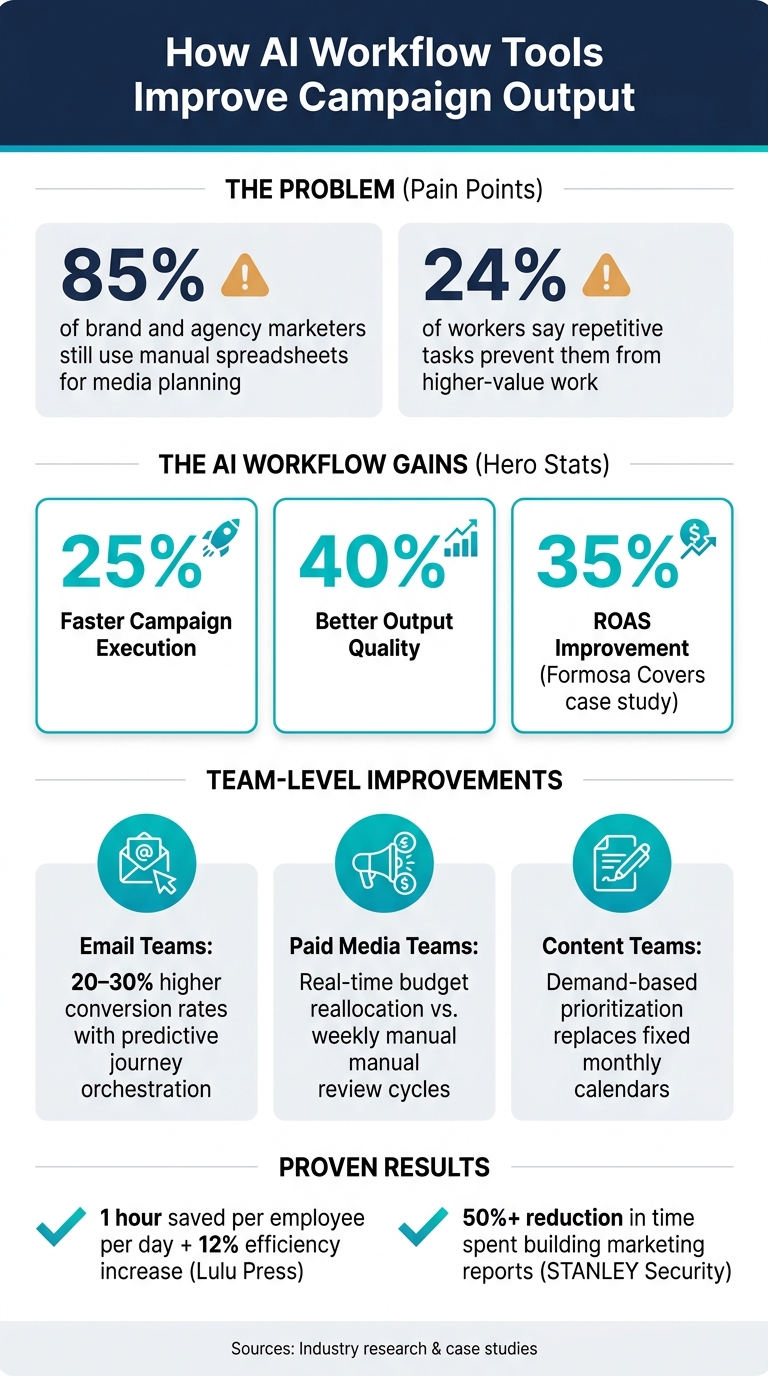
How AI Workflow Tools Boost Campaign Performance: Key Stats & Gains
5 real AI marketing workflows that actually work | AI in the wild
sbb-itb-daf5303
How AI Workflow Tools Fix These Bottlenecks
This is where AI workflow tools shift from simple automation to better execution.
They use live performance data and audience signals to decide the next move, then carry it out. In some cases, that cuts decision time from about 120 minutes to 15 minutes.
Reordering Tasks Based on Risk and Opportunity
One of the most useful things these tools do is change the order of work based on what’s happening inside a campaign. If bounce rates climb before an email launch, the system moves list cleanup ahead of the launch. If CPL jumps in a paid campaign, it pushes ad-set review ahead of making new creative.
That means teams spend time on the work with the most risk or the most upside at that moment, instead of just following a fixed to-do list.
Channel Mix, Send Time, and Feedback Loops in One System
The same idea applies to delivery and optimization across channels.
AI workflow tools pull together CRM, ad, and analytics data to adjust channel mix, personalize send time, and feed results into the next campaign decision. Teams report faster execution and better output quality.
Those workflow shifts look different across email, paid media, and content teams.
How Email, Paid Media, and Content Teams Use AI Workflows
The same workflow logic plays out in different ways across teams. For email, it sharpens timing and sequencing. For paid media, it improves where budget goes. For content, it helps teams decide what to make first and how fast to revise it.
Email Teams: Better Send Times and Smarter Before-Send Sequencing
Email teams are moving away from one-size-fits-all send windows. Instead, they use per-recipient send-time personalization based on open and click history.
AI also swaps out static persona journeys for behavior-based triggers. So if a contact visits a pricing page three times, that person gets a different next message than someone who only opened a newsletter. That kind of sequencing helps explain the 20–30% higher conversion rates companies see when they use predictive models for journey orchestration.
There’s also a workflow piece that saves a lot of back-and-forth. When a draft moves to Approved status, the system can automatically assign design, QA, and scheduling tasks without Slack follow-ups or status meetings. And if bounce rates or complaint rates spike during the send, automated kill switches pause the campaign before the problem snowballs.
| Email Workflow Phase | Manual Process | AI-Optimized Process |
|---|---|---|
| Send-Time Selection | Static "best practice" windows | Personalized per recipient based on behavior |
| Audience Sequencing | Fixed journeys by broad persona | Dynamic triggers based on real-time intent signals |
| Pre-Send Approvals | Manual handoffs via Slack or email | Automated triggers on document status changes |
The same automation logic that improves timing in email shows up in paid media as budget routing.
Paid Media Teams: Budget Routing and Faster Channel Mix Updates
For paid media teams, the core issue is speed. Manual review cycles leave budget sitting in weak placements for too long. AI workflows watch CAC and ROAS all the time, then reallocate spend to stronger channels, audiences, or creatives before performance drops in a way everyone can see. In plain English: the channel mix updates based on live performance signals, not last week’s report.
In 2026, Formosa Covers used Amazon Ads' AI image generation to place products in lifestyle scenes. The result was a 22% lift in clicks, a 21% lift in orders, and a 35% ROAS improvement.
| Workflow Area | Manual Paid Media | AI-Optimized Paid Media |
|---|---|---|
| Optimization Cadence | Weekly or monthly review cycles | Real-time, moment-by-moment |
| Budget Reallocation | Reactive, based on past performance | Proactive, shifts before performance degrades |
| Creative Rotation | Manual A/B test tickets | Automated continuous testing |
Content teams use that same feedback loop earlier, before launch instead of after spend begins.
Content Teams: Faster Production With Live Performance Feedback
Content teams often get stuck in two places. First, they create assets before demand is there. Second, they learn that a piece missed the mark weeks after it goes live. AI workflows help on both fronts.
At the start of the process, demand-based prioritization replaces the fixed monthly content calendar. Instead of publishing by habit, the system spots which briefs connect to active buying signals or rising product demand and moves those to the front of the line. That means the right brief gets attention before production starts. The same workflow can also generate briefs from historical performance and brand data, so teams begin with context instead of a blank page.
After launch, live performance monitoring spots CTR or conversion drops and triggers revision suggestions or new headline tests automatically. That way, teams don’t have to wait for end-of-quarter reviews to make a change.
| Feature | Traditional Content Workflow | AI-Enhanced Content Workflow |
|---|---|---|
| Prioritization | Fixed monthly content calendar | Real-time demand signals and intent data |
| Task Routing | Manual assignments via email, Slack, or PM tools | Automated routing based on status changes |
| Feedback Loop | End-of-quarter retrospectives | Live monitoring triggers immediate creative pivots |
How to Roll Out AI Workflows Without Disrupting the Team
Once your workflow use cases are clear, the next move is rollout. The teams that get the most from AI workflows don’t try to automate everything on day one.
Start With One Measurable Workflow and Clear Guardrails
Begin with a single workflow that already affects speed, quality, or cost. One simple example is email send-time optimization. It runs on a set schedule, eats up time, and usually doesn’t improve the final output when handled by hand.
Before you launch, decide how you’ll measure success. Track hours saved or a drop in turnaround time so you can show the impact in plain terms. Lulu Press saved 1 hour per day, per employee by putting automated workflows in place, which increased work efficiency by 12%. That kind of result only stands out when you compare performance before and after.
Guardrails matter just as much as the workflow itself. Every AI-generated output should go through a human review step before it goes live. It also helps to set hard-stop rules for things like:
- spend spikes
- complaint spikes
- off-brand output
That way, a small mistake doesn’t turn into an expensive one.
Once the pilot shows clear value, map the inputs and owners before you expand.
Map Inputs, Ownership, and Expected Gains Before Scaling
Write down the current steps, who owns each one, which tools are involved, and where delays tend to happen. This makes it easier to spot the best automation targets and keeps you from building on a shaky process.
The table below shows a four-phase rollout that keeps each step measurable:
| Phase | Focus Activity | Key Metrics |
|---|---|---|
| Audit | Document current steps, owners, and manual delays | Labor hours, error rates |
| Pilot | Implement one AI workflow | Hours saved, turnaround time |
| Rollout | Connect CRM and intent signals to activation channels | Conversion lift, execution speed |
| Scale | Deploy automated budget and creative shifts | Pipeline velocity, ROAS, CAC |
Before you scale, clean the data. AI tools don’t work well with disconnected or inconsistent inputs. Standardize your UTMs, naming rules, and attribution rules so the system learns from clean data. STANLEY Security cut the time spent building marketing reports by 50% or more.
If your team needs help setting up the first workflow, Hello Operator offers project-based AI solutions with human oversight built in.
Conclusion: Better Campaign Output Starts With Better Workflow Decisions
After the pilot and rollout plan, the takeaway is simple: campaign output gets better when workflow decisions get better.
The biggest payoff comes from automating decisions, not just tasks. Teams using AI-assisted decisioning report 25% faster campaign execution and a 40% improvement in output quality. That lift comes from better targeting, tighter timing, and faster budget moves across task order, channel mix, send timing, and feedback loops.
The smart way to start is small. Pick one workflow, measure it clearly, and scale only after it proves practical ROI. That could be send-time optimization, channel routing, or audience selection.
Hello Operator can help teams build that first workflow with clear guardrails and human oversight.
FAQs
What is an AI workflow tool?
An AI workflow tool uses artificial intelligence to automate, coordinate, and improve marketing tasks across the full campaign lifecycle. It helps teams plan, create, launch, measure, and refine campaigns by using real-time performance and customer data.
By taking care of repeat work like content updates, scheduling, and budget reallocation, it gives teams more time for strategy and big ideas. Hello Operator helps teams build custom AI workflows and connect them to their existing marketing systems.
Which campaign workflow should we automate first?
Start with workflows that repeat often, follow clear rules, and involve messy manual handoffs. Good early picks include long-form content production, ad variant creation, email and landing page setup, and lead scoring or list enrichment.
Map your current process first so you can spot bottlenecks. Then pick one small, high-impact use case, test it, and build from there as your team gets more comfortable.
How much clean data do AI workflows need?
AI workflows need high-quality, clean, structured data because campaign output depends on the accuracy of the information going into your systems.
Before implementation, audit and standardize your data across sources. That includes tracking identifiers, consent flags, and naming conventions. If those inputs are messy, your output will be too. It’s the classic garbage in, garbage out problem.
Automated quality checks can catch issues early, like broken tracking or incorrect spend figures, before they start skewing results.
Related Blog Posts

