

If you want one answer fast: most teams should pick tools based on team size, reporting depth, and whether sentiment and listening matter. In 2026, AI social media tools save 15 to 20 hours per week, and 71.1% of marketers say time savings is the top upside.
Here’s the short version:
- Hootsuite Social OS works well for multi-channel reporting, sentiment, and forecast views
- Sprout Social + Brandwatch fit teams that need deeper listening, crisis alerts, and more metrics
- Buffer + Whatagraph suit smaller teams that want simple dashboards and low starting cost
- Hello Operator fits teams that need custom workflows, custom KPI logic, and human-reviewed AI summaries
What matters most is simple:
- Small teams: low cost and easy setup
- Mid-size teams: multi-account reporting and stronger analysis
- Large teams: sentiment depth, governance, and API/BI access
One issue still trips teams up: revenue attribution. Engagement is easy to track. Tying it to sales is much harder. So if ROI matters, I’d put extra weight on tools with forecasting, ROI reporting, or custom workflow support.
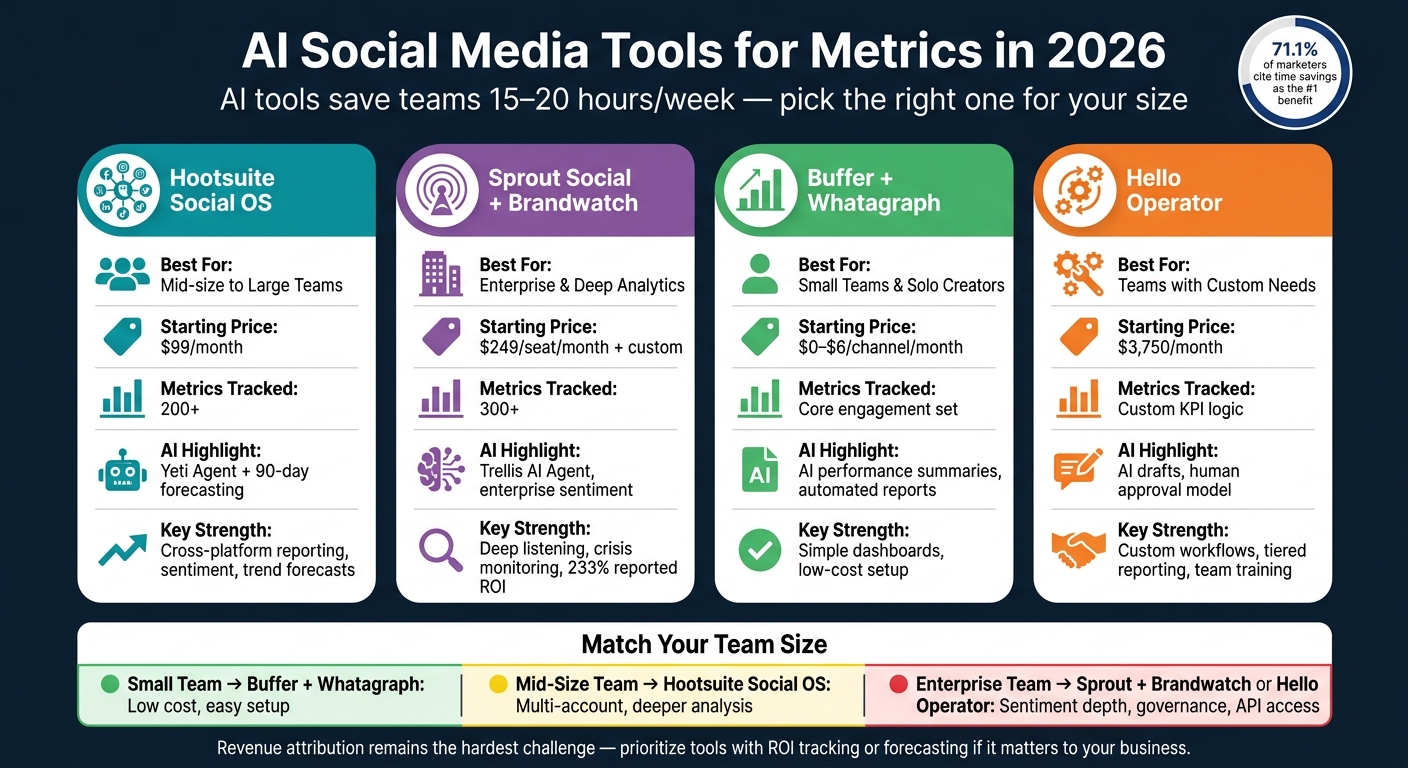
AI Social Media Tools Compared: Best Picks for Every Team Size in 2026
How to Create Social Media Reports in Minutes with AI
sbb-itb-daf5303
Quick Comparison
| Tool | Best Fit | Starting Price | Main Strength |
|---|---|---|---|
| Hootsuite Social OS | Mid-size to large teams | $99/month | Cross-platform reporting, sentiment, forecasts |
| Sprout Social + Brandwatch | Large teams | $249/seat/month + custom pricing | Deep listening, sentiment, crisis monitoring |
| Buffer + Whatagraph | Small teams | $0 to $6/channel/month | Simple reports, low-cost setup |
| Hello Operator | Teams with custom needs | $3,750/month | Custom AI workflows, KPI-based summaries, team training |
If I were choosing, I’d start with the reporting problem first, not the feature list. That makes the rest of the article much easier to use.
Top AI Tools for Social Media Metrics Analysis
These tools help teams turn engagement data into faster, clearer decisions. They work for every team size, from solo creators to enterprise marketing groups. The best pick usually comes down to team size, how deep your reporting needs to go, and whether social listening matters to you.
Hootsuite Social OS for Cross-Platform Engagement Reporting

If you need one place to track performance across several networks, Hootsuite is a solid starting point. Hootsuite Social OS is built for mid-size to enterprise teams that manage multiple profiles across Instagram, TikTok, LinkedIn, and X. It pulls engagement reporting and listening into a single workflow, which helps when you're juggling a lot of channels at once.
Blue Silk™ handles sentiment and trend detection. It classifies sentiment and flags emotional tone, while Yeti Agent gives plain-language performance summaries with citations and suggested next steps. Hootsuite also forecasts trends and conversation volume up to 90 days ahead. That makes it useful for campaign planning and executive reporting, where teams need more than a basic snapshot. Pricing starts at $99/month for one user, with team plans at $249/month.
Sprout Social and Brandwatch for Sentiment, Listening, and Trend Analysis
If your team needs deeper sentiment analysis and listening, Sprout Social and Brandwatch go further. Sprout Social tracks 300+ metrics and pairs them with Trellis AI Agent, which lets users ask natural-language questions about their data. Work that once took hours can drop to minutes.
When teams add Brandwatch, they get enterprise-grade listening and crisis detection alongside Sprout's sentiment scoring. That's a good match for reputation management and support teams that need to spot issues before they snowball. Sprout Social reports a 233% ROI for organizations using its AI-powered platform. Plans start at $249/seat/month, while Brandwatch uses custom pricing that starts around $800/month.
Buffer Analytics and Whatagraph for Simple Dashboards and Automated Reports
For lean teams, Buffer and Whatagraph keep things simple. Buffer focuses on core post metrics like reach, clicks, and top posts, and its AI Assistant summarizes performance and suggests what to post next. It doesn't try to do everything, which is part of the appeal for smaller teams.
Whatagraph adds a cleaner reporting layer on top. It combines metrics into dashboards built for monthly reviews or executive sign-off. Put together, the two tools give teams simple reporting without a big price tag. Buffer's free plan supports up to 3 channels, and paid plans start at $6/month per channel.
| Tool | Best For | Entry Price | Metrics Tracked | AI Highlight |
|---|---|---|---|---|
| Hootsuite Social OS | Mid-size to enterprise teams | $99/mo | 200+ | Yeti Agent; 90-day forecasting |
| Sprout Social + Brandwatch | Enterprise; deep analytics | $249/seat/mo | 300+ | Trellis AI Agent; sentiment scoring |
| Buffer + Whatagraph | Small business; simplicity | $0–$6/channel/mo | Core engagement set | AI performance summaries; automated reports |
Comparing AI Tools for Social Media Engagement Metrics
When you compare these tools, focus on reporting depth, speed, and how well they fit your team’s day-to-day workflow. Feature count sounds nice on paper, but it usually doesn’t tell you how useful a tool will be once you’re inside it.
Metrics, AI Features, and Visualization Depth
Hootsuite Social OS covers broad, cross-platform listening. Sprout Social and Brandwatch go deeper into audience data and sentiment analysis. Buffer and Whatagraph keep things simpler, with clean dashboards and straightforward engagement reporting.
That’s where the split shows up now: listening depth, AI summaries, and dashboard quality. Hootsuite’s natural-language reporting makes it easier to ask direct questions about performance instead of clicking through tab after tab. Brandwatch stands out when sentiment depth and market intelligence matter most.
| Tool | Key Differentiator | AI Standout | Visualization Depth |
|---|---|---|---|
| Hootsuite Social OS | Cross-platform listening across 150M+ sources in 187 languages | Natural-language reporting | High - deeper listening and trend analysis |
| Sprout Social + Brandwatch | Demographics, CRM-linked data, enterprise sentiment | Enterprise-grade sentiment and listening | High - shareable dashboards and reports |
| Buffer + Whatagraph | Core engagement metrics | Simple reporting workflow | Medium - clean, straightforward dashboards |
One part still gives teams a headache: revenue attribution. Social engagement is easy to track. Tying that activity back to dollars is much harder. If that matters for your business, put extra weight on tools with ROI tracking or predictive insights.
Workflow Fit for Small Business, Mid-Market, and Enterprise Teams
Team size and reporting cadence matter more than most people think.
| Team Type | Best Fit | Key Factors |
|---|---|---|
| Small Business / Solo | Buffer + Whatagraph | Low-friction setup, simple dashboards, core metrics |
| Mid-Market / Agency | Hootsuite Social OS or Sprout Social | Multi-account management, team reporting, deeper analytics |
| Enterprise / Multi-Brand | Brandwatch or Hootsuite Social OS | Governance, deep sentiment, broad listening |
The biggest wins tend to come from matching the tool to the way the team already reports. A solo operator usually wants something light and easy. An agency may need stronger account handling and client-facing reports. Larger teams often need governance, deeper sentiment data, and broad listening across many brands.
When built-in dashboards start to fall short, custom AI workflows can help close the gap.
Custom AI Social Media Metrics Workflows with Hello Operator
When built-in dashboards leave gaps, custom workflows step in with your own goals, KPIs, and baselines. Hello Operator adds these workflows when standard dashboards fall short and you need reporting shaped around your team’s context.
Data from LinkedIn, Instagram, and other channels flows into one central reporting sheet. From there, AI compares performance against goals and baseline ranges, then drafts a summary your team can review and use.
Unified Dashboards, AI Summaries, and Team Training
Hello Operator brings together on-demand AI marketing specialists, custom-built AI solutions, and hands-on team workshops to help teams move away from manual reporting and toward systems people will use.
Once the right context is loaded, the AI can move past generic summaries. It can start flagging what matters: anomalies, sentiment shifts, and clear action items. Custom workflows built through Hello Operator can include a Context Pack - a document that gives the AI your quarterly goals, current campaigns, and historical baseline performance ranges.
These workflows can also follow a tiered reporting setup:
- Weekly updates focused on content tweaks and day-to-day decisions
- Monthly reviews centered on performance and strategy
- Quarterly summaries tied to business impact and ROI
They can also normalize engagement across platforms, so comparisons are direct instead of based on a messy mix of native metrics.
Reusable reporting workflows can follow your brand’s reporting rules, keep summaries in a consistent voice, and connect engagement data back to content decisions. This is not an autopilot setup. It runs on an AI drafts, humans approve model: AI handles data gathering and first-draft analysis, and your team adds judgment and direction.
For teams that want to build these skills in-house, Hello Operator also runs AI marketing workshops shaped around specific challenges. That might mean learning how to read AI-generated summaries, getting more comfortable with automated reporting, or setting up experiment trackers that connect post performance to the original hypothesis.
Pricing starts at $3,750/month for ongoing, on-demand support. Project-based engagements start at $5,950/month for teams building specific AI applications or automating defined workflows.
Implementation Notes and Final Takeaways
After comparing tools, the next move is disciplined implementation.
Start with clean source data. Check platform connections, remove duplicate feeds, split paid from organic, and standardize engagement definitions before running AI analysis. If the input is messy, the output will be too.
Too many metrics can muddy the picture. Pick a small set of business-linked KPIs, then automate marketing reports by building the dashboard around those numbers. Less noise, more signal. Use color-coded callouts to highlight wins and underperformance at a glance. Clear color cues make it easier for stakeholders to scan results fast.
Once KPIs are locked in, reporting access and data governance need the same care. Privacy controls are required in 2026. Use role-based access, server-side tracking, and regular permission audits to protect performance data.
AI can spot patterns fast, but human review still counts. Sarcasm, context, and final judgment still need a person in the loop.
How to Choose the Right AI Metrics Stack in 2026
Match the stack to the job. Small teams usually need speed and low-cost integration. Agencies tend to need client-ready dashboards and white-labeling. Enterprise teams often need deeper sentiment analysis, unified data architecture, and BI API access.
| Team Type | Best Use Case | Key Selection Criteria |
|---|---|---|
| Small Business | Speed and automation | Low cost, integrated content workflows |
| Agency | Client reporting | White-labeling, multi-brand dashboards |
| Enterprise | Data depth | Sentiment analysis, BI API access, unified architecture |
FAQs
How do I choose the right tool for my team size?
Choose based on your team’s needs, size, and budget.
Small teams often do best with simple scheduling, basic analytics, and clear per-channel pricing. Larger teams usually need deeper reporting, social listening, approval workflows, and one place to manage many platforms.
Agencies may also want white-label dashboards and multi-brand management. The best way to narrow it down is to focus on your biggest bottleneck: reporting depth, platform unification, or collaboration. Then pick the tool that fits where your team is right now.
Which metrics matter most for proving social media ROI?
Focus on outcome-based metrics, not vanity metrics like likes and impressions.
The clearest signal is conversion value: revenue generated through social commerce or tracked with UTM parameters.
You should also track:
- Revenue attributed to social
- Pipeline influence
- Lead generation
For a fuller picture, look at first-touch, assisted, and influenced revenue across the customer journey.
When should I use a custom AI reporting workflow?
Use a custom AI reporting workflow when reporting starts to pile up - multiple clients, lots of channels, or a steady stream of repeat reports can turn manual work into a bottleneck fast.
It also makes sense when off-the-shelf tools feel too generic or too crowded for what you need. A custom workflow lets you focus on the metrics that drive decisions, keep control of your data, and build reporting that’s repeatable and aware of the context behind the numbers.
Related Blog Posts

